Dear Blog Readers,
Good day to you all. Just wanted to let you know that I changed my blog template so that I can leverage the new/advanced design features (of Blogger) as I was really using an old and outdated template.
Sorry for any inconvenience and enjoy Dax'ing :-)
Wednesday, August 24, 2011

Tuesday, August 23, 2011
Troubleshooting Dynamics AX2012 RTM Demo Data
Recently, I had setup an AX2012 box with RTM build (downloaded from PartnerSource), and accidentally loaded the demo data of Contoso (Beta version) and I didn't knew what was happening. I was getting all these bunch of compile errors from the standard AX Classes.
After a while, checked the application and kernel version from Help > About in Dynamics AX2012 Rich Client and noted there was a difference. Installed a new DB and AOS and now the versions are identical (RTM). Waiting from Microsoft to hear the release of RTM Demo Data
As per this forum here, I think it will be mid-Sept when Microsoft will release demo data for RTM build
https://community.dynamics.com/product/ax/f/33/p/60888/110473.aspx
Below table just gives an idea of the build numbers for Dynamics AX2012: (Extracted from axaptapedia and by confirming the same through going through AX Thick Client Help > About)
Update - I did an import of Demo Data from AX 2012 Beta instance to RTM instance via the native Import/Export utility of AX and this works.
After a while, checked the application and kernel version from Help > About in Dynamics AX2012 Rich Client and noted there was a difference. Installed a new DB and AOS and now the versions are identical (RTM). Waiting from Microsoft to hear the release of RTM Demo Data
As per this forum here, I think it will be mid-Sept when Microsoft will release demo data for RTM build
https://community.dynamics.com/product/ax/f/33/p/60888/110473.aspx
Below table just gives an idea of the build numbers for Dynamics AX2012: (Extracted from axaptapedia and by confirming the same through going through AX Thick Client Help > About)
Build number
|
Version
|
Demo Data
|
6.0.852.78
|
2012 Beta
|
6.0.852.78-contoso-SYS.bak
|
6.0.947.0
|
2012 RTM
|
6.0.947.0-contoso-SYS.bak
|
6.0.947.61
|
2012 Cumulative Update 1 (CU1
|
Update - I did an import of Demo Data from AX 2012 Beta instance to RTM instance via the native Import/Export utility of AX and this works.
Inside Microsoft Dynamics AX 2012
Thought to share these Youtube videos on Dynamics AX 2012:
Video1 - Developer Tools
- Stresses the importance of Models
- API's
- Interoperability with .Net
- 3 yrs spent by Microsoft for the new Development Tools
http://www.youtube.com/watch?v=cZc1Jya7tqM&feature=related
Video 2 - Services and AIF
- Heavy investment in Services
- Mobile applications can plug in to the service model
- 90 webservices
- Simplified and Powerful Integration
http://www.youtube.com/watch?v=sn9I6TaQY9o&feature=relmfu
Video 3 - Reporting
- Integration with Excel
http://www.youtube.com/watch?v=qx3_2oSrdpI&feature=relmfu
Video 4 - Office Integration
- Collabration across Office, AX and Visual Studio
- Demo (Budget)
http://www.youtube.com/watch?v=83Rm0Dbgb3g&feature=relmfu
Video 5 - Usability
- End-User Simplicity
- Recruited people from the industry to test the usability scenarios
- Field Surveys
- Demo AR Customers/SO's (Fact boxes)
- Consolidate Commands into Flexible Activity based Ribbons (Similar Look and feel as Excel, Word)
- Fast tabs
- "Go to Main Table" replaced by hyperlink lookups (cool feature)
http://www.youtube.com/watch?v=CCyUcbTHuc4&feature=relmfu
Video 6 - Enterprise Portal
- Rich UI
- Travel Expense Demo
- Microsoft internal adoption (aka DogFooding)
- ISV's interested to build on new add'ons for EP
http://www.youtube.com/watch?v=Td2ROxxXzcE&feature=youtube_gdata
Video 7 - Performance
- 20 x times faster than 2009
- Managed X++
- Leverages Virtualization
- Leverages AppFabric
http://www.youtube.com/watch?v=YRJaMkElvqk
Video 8 - Programmability
-Improvements in X++ Language
-Improvements in Language Performance
-Visual IDE and MorphX IDE
-Attributes
-Marrying C# and X++
-X++ managed language
-AOT in VS.Net
http://www.youtube.com/watch?v=-jUtbBGTt-U
Video 9 - Security
-Improved Administration Experience for setting up Security
-Flexible Authentication (Leverages Claim Based Authentication from Sharepoint)
-Authorization
http://www.youtube.com/watch?v=EYQukrLQF7A&feature=channel_video_title
Video 10 - Simplicity
- Experiences for Developers, Administrators and End Users made simple
- For Developers - Goal to enrich .net and x++ developers experience
- Installation experience for Developer improved (Single Click Experience)
- Simplicity for System Administrators
- Good Feedback from Partner and Customer Channel
http://www.youtube.com/watch?v=-0C6t_vFyX0
Video 11 - Processes and Workflow
-Graphical workflow Editor for Business Users and Application Developers
-Leverages Wofklow Foundation of .Net 4.0
-Flexible Work Item Queues
-60 Workflow Types out of the box
-Sub-Workflows
http://www.youtube.com/watch?v=XQK1sZGkgvg
Video 12 - Organizational Model
-Model for External and Internal Reporting
-Policy Frameworks
-Reporting
http://www.youtube.com/watch?v=EteQAKqwnTU
Sunday, August 21, 2011
Step by Step Guide How to Install Dynamics AX2012 Enterprise Portal
How to Install Dynamics AX2012 Enterprise Portal
This is the second post in the series of installing Dynamics AX2012 Components. You can refer to the first post here - (Installing the base Dynamics AX Components - Databases, AOS, Client, Debugger, Office Addins)
http://daxdilip.blogspot.com/2011/08/step-by-step-guide-how-to-install.html
This post will talk about installing Dynamics AX2012 Enterprise Portal.
The basic pre-requisite for Installing Enterprise Portal is Sharepoint 2010 Foundation/Sharepoint 2010 Server
Since this is sandpit/training box, I would be just installing Sharepoint Foundation 2010.
i. Install the Sharepoint 2010 Pre-Requisites shown below

ii. Pre-Requisites Installed Successfully

iii. Now, start with the Foundation Installation

iv. Run the Sharepoint Configuration Wizard

v. After all the tasks are completed successfully, you are welcomed to the Sharepoint Team site

Tip - If you are planning to Install Sharepoint 2010 on Windows 7, please see the steps here which I posted a while ago - http://daxdilip.blogspot.com/2009/11/how-to-install-and-configure-sharepoint.html
Installing Dynamics AX2012 Enterprise Portal
i. Now, let's go ahead and install Enterprise Portal Component. Run the setup and click Next

ii. Check the Pre-Requisite Validation runs fine and then move next

iii. Enter the .Net BC Connector Information

iv. Configure the website, I just left the defaults as it is and moved next

v. Move next with the installation


vi. Encountered an error at this step

Looked at the error log file which came up, and found the below logs:
Error: Windows cannot find the local profile and is logging you on with a temporary profile. Changes you make to this profile will be lost when you log off.
Installation completed successfully, but Setup could not create the Enterprise Portal website. You can create the website by running Setup and installing Enterprise Portal again. You can also manually create a website using SharePoint Central Administration.
An error occurred during setup of Enterprise Portal (EP).
Registering tracing manifest file "C:\Program Files\Microsoft Dynamics AX\60\Server\Common\TraceProviderCrimson.man"
WEvtUtil.exe install-manifest "C:\Users\itadmin.PASPALEY\AppData\Local\Temp\tmpA5A1.tmp
**** Warning: Publisher {8e410b1f-eb34-4417-be16-478a22c98916} is installed on
Troubleshooting:
Didn't spent much time on troubleshooting this one as I have seen this error of logging with temporary profile before, but not with EP. The simplest solution which worked for me was to restart the box , login back and run the Enterprise Portal Setup again and that fixed the issue.

Finally, the Role center page arrives :-)... I can recall my pervious experience with Dynamics AX 4.0 and 2009 version, never I was able to install MOSS and Enterprise Portal at the first go successfully without too many hiccups.

Additional Tip/Note -
Installation of Sharepoint Foundation 2010 Creates a new SQL Server named instance for e.g. In this case TEST-DEMOAX2012/Sharepoint where all sharepoint related databases can be found

Thursday, August 18, 2011
Step by Step Guide How to Install Dynamics AX 2012 - Part 1
How to Install and Configure Dynamics AX 2012 Components
Over the past few weeks, I was involved in installing and configuring Dynamics AX 2012 Components on couple of machines running Server 2008 and Windows 7 Enterprise O/S.
Thought I will share my experience here in a series of posts covering installation of all major components of AX 2012 - Database, AOS, Client, EP Components, Sharepoint 2010, Reporting Services and Business Intelligence.
Overall Installation Experience/Highlights: (Good)
a. I can say compared to my previous experiences with installation of Dynamics AX 4.0 and 2009, Dynamics AX2012 is less error-prone and satisfactory even though, the number of Pre-Requisites to be installed is quite a significant one in 2012
b. Validate Pre-Requisite Tool is quite handy which helps one to prepare for installation so that one is not taken by surprise when he/she performs the actual installation of components
c. Summary Report which comes up at the end is quite cool and user-friendly.
Considerations:
a. Requires more computing power in terms of RAM (As per System Requirements Guide it says 4 GB is the minimum). And from my personal experience, I have seen that AOS service (AX32serv.exe at it's peak, especially when you start the service and bring up the AX Client first time, it goes up close to 1 GB).
b. I also tried the fully loaded image from PartnerSource on a machine which had overall 6GB RAM, allocated 4GB to the VM, but still it was crawling. It took me ages to bring up the AOS Service.
c. Since now the AOD is no longer file based and the models reside in SQL Server, you also need to plan ahead for the disk capacity for your SQL boxes. Standard AX database (Application) along with the model database (AOD) bulks up to 3 GB approx and if you want Contoso DB (Demo Data loaded) you should free up atleast 10 GB.
Ok, Now I will jump start the installation process starting with installation of Database, AOS and Client Components. I had captured the screenshots along the way as this will help me and my peers when we setup DEV, Test, Pre-Prod and Prod Environments.
Initial Setup Screen

Pre-Requisite Validation Utility
Note - Here, I'm just installing the components which are checked below: Database, AOS, Client Components, Debugger (My favorite ;-) and Management Utilities
Tip - I would suggest from my personal experience of installing AX, even though Single-Computer Installation sounds easy and quick but we don't get the proper control here, so I prefer Custom Installation and choose my components, easy to troubleshoot and learn as we go


This screen shows you the list of validation errors which means you need to install the base pre-requisites software before you proceed.
The first error shown below is about the SQL Server Full Text Search is not installed or the service is not running

Launch SQL Server Setup and Install Full-Text Search component

Next, comes the Report Viewer Control. You need to download it from here http://www.microsoft.com/download/en/details.aspx?id=6442

Some other pre-requisites which needs to be configured and installed are as follows:
Please Note, as per the Operating System whether it's Server 2008 or Win 7, it might ask you for some other pre-requisites as well, so I would suggest you run the pre-requisite validator and please don't go by the assumption that the above links are the ONLY pre-requisites required.
.
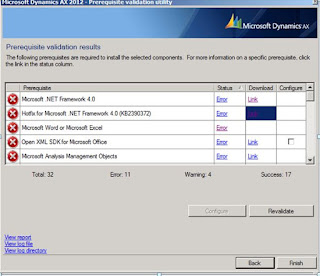

Once the Pre-Requisites are installed successfully, you can kick start the Installation


Tip - You can change the location here


Select the Components you want to install, based on your implementation topology you might want to install different components on different boxes. As I'm setting up a Sandbox at the moment, I just installed everything in one box


You can change the database names at this step below if you want to.


Key in the ports for AOS and Services

Note - For demo or training purposes, it's ok to go with network service but when you are setting up for pre-prod or production environments, you should choose a proper service account for AOS Account

All set and ready to go...


You can take a break now ;-) and come back as this step took me good 15-20 mins time!


And this too.. The Summary Report comes up quite good (This is a new installation feature in 2012 which is a brief summary of the components installed )


Next, you can go ahead with the Compile Checklist.. One other small nice feature which I like is "Processing..." pop up below, it's quite interactive unlike previous versions, where you don't know what's happening and everything looks stuck

Next, I will be posting my experience on other big components of AX2012 starting with Configuring EP, Sharepoint 2010, SSRS and Business Intelligence. Keep looking at this space!! Till then Happy Dax'ing...
Over the past few weeks, I was involved in installing and configuring Dynamics AX 2012 Components on couple of machines running Server 2008 and Windows 7 Enterprise O/S.
Thought I will share my experience here in a series of posts covering installation of all major components of AX 2012 - Database, AOS, Client, EP Components, Sharepoint 2010, Reporting Services and Business Intelligence.
Overall Installation Experience/Highlights: (Good)
a. I can say compared to my previous experiences with installation of Dynamics AX 4.0 and 2009, Dynamics AX2012 is less error-prone and satisfactory even though, the number of Pre-Requisites to be installed is quite a significant one in 2012
b. Validate Pre-Requisite Tool is quite handy which helps one to prepare for installation so that one is not taken by surprise when he/she performs the actual installation of components
c. Summary Report which comes up at the end is quite cool and user-friendly.
Considerations:
a. Requires more computing power in terms of RAM (As per System Requirements Guide it says 4 GB is the minimum). And from my personal experience, I have seen that AOS service (AX32serv.exe at it's peak, especially when you start the service and bring up the AX Client first time, it goes up close to 1 GB).
b. I also tried the fully loaded image from PartnerSource on a machine which had overall 6GB RAM, allocated 4GB to the VM, but still it was crawling. It took me ages to bring up the AOS Service.
c. Since now the AOD is no longer file based and the models reside in SQL Server, you also need to plan ahead for the disk capacity for your SQL boxes. Standard AX database (Application) along with the model database (AOD) bulks up to 3 GB approx and if you want Contoso DB (Demo Data loaded) you should free up atleast 10 GB.
Ok, Now I will jump start the installation process starting with installation of Database, AOS and Client Components. I had captured the screenshots along the way as this will help me and my peers when we setup DEV, Test, Pre-Prod and Prod Environments.
Initial Setup Screen

Pre-Requisite Validation Utility
Note - Here, I'm just installing the components which are checked below: Database, AOS, Client Components, Debugger (My favorite ;-) and Management Utilities
Tip - I would suggest from my personal experience of installing AX, even though Single-Computer Installation sounds easy and quick but we don't get the proper control here, so I prefer Custom Installation and choose my components, easy to troubleshoot and learn as we go


This screen shows you the list of validation errors which means you need to install the base pre-requisites software before you proceed.
The first error shown below is about the SQL Server Full Text Search is not installed or the service is not running

Launch SQL Server Setup and Install Full-Text Search component

Next, comes the Report Viewer Control. You need to download it from here http://www.microsoft.com/download/en/details.aspx?id=6442

Some other pre-requisites which needs to be configured and installed are as follows:
- .Net Framework 4.0 http://www.microsoft.com/download/en/details.aspx?displaylang=en&id=17718
- Hotfix for .Net Fx 4.0 http://archive.msdn.microsoft.com/KB2390372/Release/ProjectReleases.aspx?ReleaseId=4917 (Select the correct hotfix based on your OS 32-bit or 64-bit)
- Open XML SDK for Microsoft Office http://www.microsoft.com/download/en/details.aspx?displaylang=en&id=5124
- (Tip - Install OpenXMLSDKv2.msi first and then OpenXMLSDKTool.msi, otherwise it spits out error)
- SQL Server Analysis Management Objects http://go.microsoft.com/fwlink/?LinkId=130655
- VC++ 2008 SP1 Redistributable (x86) http://www.microsoft.com/download/en/details.aspx?displaylang=en&id=5582
- VC++ 2008 SP1 Redistributable (x64) http://www.microsoft.com/download/en/details.aspx?
- VSTO http://go.microsoft.com/fwlink/?LinkId=158918
Please Note, as per the Operating System whether it's Server 2008 or Win 7, it might ask you for some other pre-requisites as well, so I would suggest you run the pre-requisite validator and please don't go by the assumption that the above links are the ONLY pre-requisites required.
.


Tip - You can change the location here


Select the Components you want to install, based on your implementation topology you might want to install different components on different boxes. As I'm setting up a Sandbox at the moment, I just installed everything in one box

Didn't thought of much experimenting with Themes so left it as it is.


You can change the database names at this step below if you want to.


Key in the ports for AOS and Services

Note - For demo or training purposes, it's ok to go with network service but when you are setting up for pre-prod or production environments, you should choose a proper service account for AOS Account

This is kinda cool as you have the option below to choose the installation type as Developer, Administrator or Business and accordingly it will bring up the workspace for you after the install. At this moment, I'm wearing the administrator hat :-)
All set and ready to go...


You can take a break now ;-) and come back as this step took me good 15-20 mins time!


I love this :-)

And this too.. The Summary Report comes up quite good (This is a new installation feature in 2012 which is a brief summary of the components installed )


Next, you can go ahead with the Compile Checklist.. One other small nice feature which I like is "Processing..." pop up below, it's quite interactive unlike previous versions, where you don't know what's happening and everything looks stuck

Next, I will be posting my experience on other big components of AX2012 starting with Configuring EP, Sharepoint 2010, SSRS and Business Intelligence. Keep looking at this space!! Till then Happy Dax'ing...
Subscribe to:
Posts (Atom)