Dynamics AX Code Samples on MSDN, Just enter the search text "Dynamics AX" to do a search in the code gallery
http://code.msdn.microsoft.com/Project/ProjectDirectory.aspx?ProjectSearchText=Dynamics%20AX
Showing posts with label DEV TOOLS. Show all posts
Showing posts with label DEV TOOLS. Show all posts
Wednesday, December 29, 2010

Saturday, December 4, 2010
Fiddler - Good tool to check EP web page, custom websites, performance and AIF Web services
Recently, I was evaluating some tools for troubleshooting performance related to EP web pages.
I just bumped upon this site to find some great tools for testing performance of webpages, websites, sharepoint sites etc.
http://blogs.msdn.com/b/sanjaynarang/archive/2009/04/18/sharepoint-performance-stress-load-testing.aspx
Out of the links in the browser add-ons, I evaluated Fiddler http://www.fiddler2.com/Fiddler2/firstrun.asp and it's quite handy, after installation it sits quietly in the browser window and then each page you load, it will show you the statistics in terms of how much time each functionality took to load, like web controls, web menus etc.
Good handy tool for any website debugging, Also with AIF Web Services, it shows you the xml sent between calls.
I just bumped upon this site to find some great tools for testing performance of webpages, websites, sharepoint sites etc.
http://blogs.msdn.com/b/sanjaynarang/archive/2009/04/18/sharepoint-performance-stress-load-testing.aspx
Out of the links in the browser add-ons, I evaluated Fiddler http://www.fiddler2.com/Fiddler2/firstrun.asp and it's quite handy, after installation it sits quietly in the browser window and then each page you load, it will show you the statistics in terms of how much time each functionality took to load, like web controls, web menus etc.
Good handy tool for any website debugging, Also with AIF Web Services, it shows you the xml sent between calls.
Sunday, August 15, 2010
Dynamics AX Spell Checker API
The other day, I was looking for Spell Checker API in AX and stumbled onto these two very useful links on www. It shows the usage of SysSpellChecker Class in AX which uses the COM Word Application Library
http://palleagermark.blogspot.com/2008/02/spell-checking-from-ax.html
http://sangi1983.spaces.live.com/blog/cns!264A0056CBCBB1D3!404.entry
http://palleagermark.blogspot.com/2008/02/spell-checking-from-ax.html
http://sangi1983.spaces.live.com/blog/cns!264A0056CBCBB1D3!404.entry
Error message when you read an .XML file that has a large text field in Microsoft Dynamics AX 4.0
Processing larger files in AX, Please backup the registry before you do any modifications to it
SYMPTOMS
You read an XML file that has a large text field in Microsoft Dynamics AX 4.0. For example, the document size is 5432150 characters, and the large text field is 5429024 characters. In this scenario, the XmlElement.text function fails. Additionally, you receive the following error message:
Error in getting through from code: Shorthanded memory to getting through from script.
Stacktrace
(C)\Classes\XmlElement\text
(C)\Classes\PrismeXML_Base\traverse - line 58
(C)\Classes\PrismeXML_Base\run - line 12
(C)\Classes\PrismeXML_Base\interpret - line 67
(C)\Jobs\CallOIOInterpreter - line 15
CAUSE
This problem occurs because there is no more memory space available. By default, the size for the memory allocation in the Application Object Server (AOS) is set to 10 MB at installation. If your implementation requires manipulation of data elements over 10 MB, memory allocation fails. You may or may not see an error message if memory allocation fails when this limit is exceeded.
RESOLUTION
To resolve this problem, modify the maxbuffersize registry key on the client computer or the computer that is running the AOS server. Or, break the XML file into smaller sizes possibly 500 -1000 line items.
Note The following steps will bring your AOS server offline temporarily because of a service reset.
To modify the maxbuffersize registry subkey on the client computer, follow these steps:
1. Click Start, click Run, type Regedit, and then click OK.
2.Locate and then click the following registry subkey:
HKEY_CURRENT_USER\Software\Microsoft\Dynamics\4.0\Configuration\your current config name.
3.Set the value for the maxbuffersize registry key to the maximum message size in MB. Or, set the value to zero (0) to have no restriction on the size of documents.
4.Restart the client computer.
To modify the maxbuffersize registry key on the computer that is running the AOS server, follow these steps:
1.Click Start, click Run, type Regedit, and then click OK.
2.On the AOS server, open the server configuration settings:
HKEY_LOCAL_MACHINE\SYSTEM\CurrentControlSet\Services\Dynamics Server\4.0\instance name\config name
3.Set the value for the maxbuffersize registry key to the maximum message size in MB.
4.Restart the AOS service.
SYMPTOMS
You read an XML file that has a large text field in Microsoft Dynamics AX 4.0. For example, the document size is 5432150 characters, and the large text field is 5429024 characters. In this scenario, the XmlElement.text function fails. Additionally, you receive the following error message:
Error in getting through from code: Shorthanded memory to getting through from script.
Stacktrace
(C)\Classes\XmlElement\text
(C)\Classes\PrismeXML_Base\traverse - line 58
(C)\Classes\PrismeXML_Base\run - line 12
(C)\Classes\PrismeXML_Base\interpret - line 67
(C)\Jobs\CallOIOInterpreter - line 15
CAUSE
This problem occurs because there is no more memory space available. By default, the size for the memory allocation in the Application Object Server (AOS) is set to 10 MB at installation. If your implementation requires manipulation of data elements over 10 MB, memory allocation fails. You may or may not see an error message if memory allocation fails when this limit is exceeded.
RESOLUTION
To resolve this problem, modify the maxbuffersize registry key on the client computer or the computer that is running the AOS server. Or, break the XML file into smaller sizes possibly 500 -1000 line items.
Note The following steps will bring your AOS server offline temporarily because of a service reset.
To modify the maxbuffersize registry subkey on the client computer, follow these steps:
1. Click Start, click Run, type Regedit, and then click OK.
2.Locate and then click the following registry subkey:
HKEY_CURRENT_USER\Software\Microsoft\Dynamics\4.0\Configuration\your current config name.
3.Set the value for the maxbuffersize registry key to the maximum message size in MB. Or, set the value to zero (0) to have no restriction on the size of documents.
4.Restart the client computer.
To modify the maxbuffersize registry key on the computer that is running the AOS server, follow these steps:
1.Click Start, click Run, type Regedit, and then click OK.
2.On the AOS server, open the server configuration settings:
HKEY_LOCAL_MACHINE\SYSTEM\CurrentControlSet\Services\Dynamics Server\4.0\instance name\config name
3.Set the value for the maxbuffersize registry key to the maximum message size in MB.
4.Restart the AOS service.
Thursday, May 13, 2010
Query on EP Developer Tools
We are setting up DEV Environment for our EP Portal Development on Dynamics AX 2009.
We would be using EP extensively in our project as we are building up some store portals web pages. Currently, our environment topology for DEV is that we have different servers for AOS and EP and Role Centers respectively. We have around 15 developers who would be using their individual machines to build up Enterprise portal pages, these guys have Windows XP running on their local pc’s with Visual Studio.
Hence, we are trying to install the EP Developer tools on their machines but the setup can’t proceed as it expects EP and Role Center to be installed on the same physical machine where we are installing Developer Tools.
Logically, I think it should be only the BC.Net which should be installed on client machines along with the DEV tools as the BC.Net knows which AOS to talk to and thereby EP and Role Centers. But, this is not working.
Can anyone enlighten me if any workaround or any solution/fix is available for this? I would appreciate if you can drop a comment here or mail me on mail.dilipn@gmail.com. If I find an answer, I will post it back here.
We would be using EP extensively in our project as we are building up some store portals web pages. Currently, our environment topology for DEV is that we have different servers for AOS and EP and Role Centers respectively. We have around 15 developers who would be using their individual machines to build up Enterprise portal pages, these guys have Windows XP running on their local pc’s with Visual Studio.
Hence, we are trying to install the EP Developer tools on their machines but the setup can’t proceed as it expects EP and Role Center to be installed on the same physical machine where we are installing Developer Tools.
Logically, I think it should be only the BC.Net which should be installed on client machines along with the DEV tools as the BC.Net knows which AOS to talk to and thereby EP and Role Centers. But, this is not working.
Can anyone enlighten me if any workaround or any solution/fix is available for this? I would appreciate if you can drop a comment here or mail me on mail.dilipn@gmail.com. If I find an answer, I will post it back here.
Thursday, February 4, 2010
Running Multiple Instances of EP on Single Machine
These days, I was looking to collect some information for configuring multiple instances of EP on a single server. e.g. running DEV and TEST EP on the same box as many clients dont have the bandwidth or budget for having 2 separate servers for both. Here's a great piece of information from Mey MeenakshiSundaram about running multiple instances of EP on the same server. Thanks Mey for the great post. It's written for Dynamics AX 4.0 but I believe this should work for Dynamics AX 2009 as well.
https://blogs.msdn.com/solutions/archive/2006/09/11/ep-configuration-single-web-server-multiple-aos-installations.aspx
https://blogs.msdn.com/solutions/archive/2006/09/11/ep-configuration-single-web-server-multiple-aos-installations.aspx
Thursday, December 24, 2009

Friday, October 30, 2009
Tip: How to export/import from SysLastValue table
Recently, I was troubleshooting an issue related to user settings. i.e. There was a requirement to migrate the user settings from one environment to another.
As we all know, User related setups for queries, forms, reports etc are stored in SysLastValue table. This is a system table and can't be accessed directly through AOT.
Solution:
NOTE: PLEASE BACK UP YOUR SYSLASTVALUE TABLE BEFORE YOU ATTEMPT THE BELOW STEPS AND TRY TO VALIDATE THE STEPS FIRST IN A TEST/SANDBOX ENVIRONMENT
1. Created a definition Group for SysLastValue table


As we all know, User related setups for queries, forms, reports etc are stored in SysLastValue table. This is a system table and can't be accessed directly through AOT.
Solution:
NOTE: PLEASE BACK UP YOUR SYSLASTVALUE TABLE BEFORE YOU ATTEMPT THE BELOW STEPS AND TRY TO VALIDATE THE STEPS FIRST IN A TEST/SANDBOX ENVIRONMENT
1. Created a definition Group for SysLastValue table

2. Filter only for SysLastValue table

3. Set up the filter criteria For export in our case we have to do for one user

4. Note that at this point when we do the export, the .dat and .def file which is generated won't be having any data in it. This is becoz by default the System tables are not included in the Standard Export/Import Wizard of AX.
We need to do a small code change inorder to achieve this, Go to AOT > Classes > SysDataExpImp

5. Modify the candoTable method inorder to comment out the code which does the system table check for SysLastValue as shown below

6. Now, once again do the export and there you go..
Initially, I tried to do the SQL way, but figured out that it doesn't work and moreover SQL is not the correct way as we can miss out on Recids.
Wednesday, September 2, 2009
Consume Service References in Dynamics AX 2009
Here's an interesting post by Brandon talking about consuming service references in Dynamics AX 2009. He goes a further deep into namespaces and the benefit of .Net namespace and intellisense when you use with X++. Thanks Brandon for the post
http://dynamics-ax.blogspot.com/2009/08/consuming-service-references-in.html
http://dynamics-ax.blogspot.com/2009/08/consuming-service-references-in.html
Sunday, August 23, 2009
X++ Web UI Framework in Enterprise Portal will be Discontinued
The X++ based Web UI Framework in Enterprise Portal will be Discontinued in Future Releases of Microsoft Dynamics AX
Effective with general availability of the next version of Microsoft Dynamics AX, Microsoft will discontinue the X++ based Web User Interface in Enterprise Portal. The current release, Microsoft Dynamics AX 2009, is the last that will include the X++ based Web User Interface. In future versions, only the Enterprise Portal ASP.NET Web User Interface Framework will be included.
Background
The Enterprise Portal X++ Web User Interface Framework is a development and runtime component of Enterprise Portal for building and rendering the Web user interface.
The Enterprise Portal X++ Web User Interface Framework first shipped with Navision-Damgaard Axapta 2.5. It includes a set of nodes in the AOT, such as Web Forms, Web Reports, and Weblets, for defining the Web user interface components. It also includes a set of X++ kernel classes for reading and generating HTML from these elements and renders them as Web pages. In addition, it includes a set of Microsoft Dynamics AX Web Parts (Web Forms Web Part, Web Reports Web Part, Web Menu Web Part, and the Generic Web Part) and a set of out-of-the box application pages in Enterprise Portal that use these Web Parts.
With Microsoft Dynamics AX 2009, a new Web User Interface Framework based on ASP.NET, with managed APIs, Visual Studio-based development tools, and out-of-the-box application pages in Enterprise Portal built with this new Web User Interface Framework. For backward compatibility, the X++ Web User Interface Framework shipped along with the new ASP.NET Web User Interface Framework in Microsoft Dynamics AX 2009
Since Microsoft Dynamics AX 2009 contains no dependencies on the Enterprise Portal X++ Web User Interface Framework, and future investment is focused on technologies built on the ASP.NET Framework-based Web User Interface, the Enterprise Portal X++ Web User Interface Framework will not ship in future Microsoft Dynamics AX releases.
Take Action
Customers, partners and ISVs using solutions based on the Enterprise Portal X++ Web User Interface Framework should plan to migrate those solutions to the Enterprise Portal ASP.NET Web User Interface Framework. For documentation about creating user controls with the Enterprise Portal ASP.NET Web User Interface Framework, go to http://msdn.microsoft.com/en-us/library/cc595764.aspx.
To learn more about the Microsoft Business Solutions Support Lifecycle, go to http://support.microsoft.com. You can also call Microsoft Business Solutions at 1-888-477-7877 with additional questions.
My thoughts:
1. This is a good move as developers with C# and VB.Net can be more productive in designing the web objects for AX. They need not depend on X++ Application Developers
2. Developing and Deploying web-based portals/webparts will be much more easier and rapid and also one can start using the new Web 3.0 framework as well as the power of Silverlight, AJAX etc.
Effective with general availability of the next version of Microsoft Dynamics AX, Microsoft will discontinue the X++ based Web User Interface in Enterprise Portal. The current release, Microsoft Dynamics AX 2009, is the last that will include the X++ based Web User Interface. In future versions, only the Enterprise Portal ASP.NET Web User Interface Framework will be included.
Background
The Enterprise Portal X++ Web User Interface Framework is a development and runtime component of Enterprise Portal for building and rendering the Web user interface.
The Enterprise Portal X++ Web User Interface Framework first shipped with Navision-Damgaard Axapta 2.5. It includes a set of nodes in the AOT, such as Web Forms, Web Reports, and Weblets, for defining the Web user interface components. It also includes a set of X++ kernel classes for reading and generating HTML from these elements and renders them as Web pages. In addition, it includes a set of Microsoft Dynamics AX Web Parts (Web Forms Web Part, Web Reports Web Part, Web Menu Web Part, and the Generic Web Part) and a set of out-of-the box application pages in Enterprise Portal that use these Web Parts.
With Microsoft Dynamics AX 2009, a new Web User Interface Framework based on ASP.NET, with managed APIs, Visual Studio-based development tools, and out-of-the-box application pages in Enterprise Portal built with this new Web User Interface Framework. For backward compatibility, the X++ Web User Interface Framework shipped along with the new ASP.NET Web User Interface Framework in Microsoft Dynamics AX 2009
Since Microsoft Dynamics AX 2009 contains no dependencies on the Enterprise Portal X++ Web User Interface Framework, and future investment is focused on technologies built on the ASP.NET Framework-based Web User Interface, the Enterprise Portal X++ Web User Interface Framework will not ship in future Microsoft Dynamics AX releases.
Take Action
Customers, partners and ISVs using solutions based on the Enterprise Portal X++ Web User Interface Framework should plan to migrate those solutions to the Enterprise Portal ASP.NET Web User Interface Framework. For documentation about creating user controls with the Enterprise Portal ASP.NET Web User Interface Framework, go to http://msdn.microsoft.com/en-us/library/cc595764.aspx.
To learn more about the Microsoft Business Solutions Support Lifecycle, go to http://support.microsoft.com. You can also call Microsoft Business Solutions at 1-888-477-7877 with additional questions.
My thoughts:
1. This is a good move as developers with C# and VB.Net can be more productive in designing the web objects for AX. They need not depend on X++ Application Developers
2. Developing and Deploying web-based portals/webparts will be much more easier and rapid and also one can start using the new Web 3.0 framework as well as the power of Silverlight, AJAX etc.
Tuesday, July 21, 2009
Announcing availability of Refresh 2 of the Microsoft Dynamics AX 2009 Demonstration Toolkit
This Refresh2 image contains a range of new software, updates that the field and partners can use to demonstrate and evaluate Microsoft Dynamics AX 2000. Including but not limited to:
o Lean Manufacturing for Microsoft Dynamics AX2009
o Customer Model Visualization Tool
o Microsoft Dynamics CRM basic installation with Outlook Client.
o Microsoft FRX and Forecaster setup and demo reports with Drilldown.
o Microsoft Dynamics AX 2009 Intelligent Data Management Framework (Beta)
o Microsoft Dynamics Sure Step
o Rapid Configuration Tool
o Hotfix Rollup 2.
o System Center Operations Manager Management Pack updated to RTM.
o Microsoft Dynamics Project Time installation
o Environment Dashboard updated to RTM
o Microsoft Dynamics Mobile “demo” for Mobile Sales setup.
o Demo data updated to current periods.
o Demand Planner 2.0 demo data setup.
o GLS Layer files for Consolidated GLS and EERU on the disk
o Performance tweaks and start up with minimal service state to minimize start up time.
o Additional tools to show web services and office integration
o Demo data change tool for Item names, Customer names and Vendor names
For a quick flash through the changes you can have a look at this video:
http://blogs.msdn.com/lcash/pages/microsoft-dynamics-ax-2009-demonstration-toolkit-refresh-2.aspx
Download - The Microsoft Dynamics AX 2009 Demonstration Toolkit – Refresh 2 is available from this link https://mbs.microsoft.com/partnersource/deployment/documentation/howtoarticles/presalesdemokitmdax2009.htm
The previous version “Refresh1” is still available on Partnersource on this link https://mbs.microsoft.com/partnersource/deployment/methodology/vpc/presalesdemokitmdax2009Refresh1
o Lean Manufacturing for Microsoft Dynamics AX2009
o Customer Model Visualization Tool
o Microsoft Dynamics CRM basic installation with Outlook Client.
o Microsoft FRX and Forecaster setup and demo reports with Drilldown.
o Microsoft Dynamics AX 2009 Intelligent Data Management Framework (Beta)
o Microsoft Dynamics Sure Step
o Rapid Configuration Tool
o Hotfix Rollup 2.
o System Center Operations Manager Management Pack updated to RTM.
o Microsoft Dynamics Project Time installation
o Environment Dashboard updated to RTM
o Microsoft Dynamics Mobile “demo” for Mobile Sales setup.
o Demo data updated to current periods.
o Demand Planner 2.0 demo data setup.
o GLS Layer files for Consolidated GLS and EERU on the disk
o Performance tweaks and start up with minimal service state to minimize start up time.
o Additional tools to show web services and office integration
o Demo data change tool for Item names, Customer names and Vendor names
For a quick flash through the changes you can have a look at this video:
http://blogs.msdn.com/lcash/pages/microsoft-dynamics-ax-2009-demonstration-toolkit-refresh-2.aspx
Download - The Microsoft Dynamics AX 2009 Demonstration Toolkit – Refresh 2 is available from this link https://mbs.microsoft.com/partnersource/deployment/documentation/howtoarticles/presalesdemokitmdax2009.htm
The previous version “Refresh1” is still available on Partnersource on this link https://mbs.microsoft.com/partnersource/deployment/methodology/vpc/presalesdemokitmdax2009Refresh1
Monday, June 22, 2009
Configuring Dynamics AX 2009 MOM Pack for SCOM
Dynamics AX 2009 MOM Pack for SCOM
A. Import Dynamics AX Management Pack
Launch SCOM Console by navigating via the following path –


D. Monitoring Dynamics AX Events


G. Monitoring Dynamics AX User


Introduction
Monitoring Microsoft Dynamics AX with Operations Manager can reduce the cost of managing a distributed Microsoft Dynamics AX system. Administrators can proactively react to changes in the system health, and can adjust the system for optimal performance and reliability.
Pre-Requisites
You must install the following software before you can use the Microsoft Dynamics AX 2009 Management Pack:
- Microsoft Dynamics AX 2009 SP1
- The Operations Manager agent must be installed on all AOS servers
- System Center Operations Manager 2007 with Service Pack 1
Understanding Management Pack Operations
The Microsoft Dynamics AX 2009 Management Pack discovers and monitors installed AOS instances without any additional configuration. The Management Pack provides data about system health, user sessions, and batch jobs for all instances of the AOS running on registered computers.
The monitoring scenarios enabled by the Management Pack include the following:
- Detect AOS instances and their states
- View the number of active user sessions on an AOS before bringing the AOS down
- View scheduled batch jobs and tasks
- Receive alerts when an AOS has unexpectedly stopped
· Troubleshoot problems by viewing event messages for monitored AOS instances
- Alerts – Warnings or errors associated with each monitored AOS, including severity. For example, an alert will be generated if the status of an AOS instance changes to Warning.
- Batch Jobs – Batch jobs scheduled to run on each AOS.
- Batch Tasks – Detailed tasks for each scheduled batch job.
- Computers – The names of all computers that AOS instances are detected on, and the health of those computers.
- Application Object Servers – Configuration and health information for individual AOS instances. An AOS can be started or stopped by using tasks in the Actions menu Note: To avoid generating alerts, we recommend placing AOS instances in maintenance mode during planned outages. In maintenance mode, alerts, notifications, rules, monitors, automatic responses, state changes, and new alerts are suppressed.
- Events – Event Log warnings and errors associated with monitored AOS instances.
- Users – A list of the users authorized to access an AOS instance, including an indication of which users are currently logged on.
Installation/Configuration & Monitoring Steps
Download the management Pack from the following link
Next steps, Install and Import the MOM Pack for Dynamics AX 2009 into SCOMA. Import Dynamics AX Management Pack
Launch SCOM Console by navigating via the following path –
Go to Authoring tab, and Click on Import Management Pack link. Navigate to the path where you
have kept the Microsoft.Dynamics.AX.Management.Pack.mp file and import it
After importing, It should show the Dynamics AX Pack related objects under the Monitoring tab
as shown here
B. Monitoring Dynamics AX AOS Instances
Once you import the pack, after couple of mins you will be able to track the AOS instances
running on your system

In the above screenshot, it monitors the:
- AOS State, indicating it’s healthy
- If there’s some issue with AOS, it shows the state as Warning
- In Detail View, it lists down the various attributes for the AOS like name, service type, database details, port details etc.
Also, one can start and stop the AOS from Maintenance mode shown

For demo purpose, I will stop the DynamicsAXBase AOS from the MOM Console. When we click on Stop AOS Maintenance mode, it brings the following task screen, Click on Run
Once, the service is stopped, it shows this dialog stating that the task is completed successfully
Now, you can see both in the MOM Console (Warning State for the AOS Stopped) and the
Services windows, it shows that the AOS is stopped
Once the service is stopped, at the same time it generates an alert which is listed in the next
section.
C. Monitoring Dynamics AX Alerts

Continuing from the above section, once the service goes offline or stopped, you can see an alert generated for the same in the Alerts Pane shown below
D. Monitoring Dynamics AX Events
Similar to alerts, we have events which picks up the events generated from Event Viewer
related to Dynamics AX AOS. E.g. taking the above example, you will see an event logged when the AOS Service was stopped

E. Monitoring Dynamics AX Batch Jobs
One can monitor the running batch jobs by going to Batch Jobs pane

You can see in Detail pane above, the batch job name status, start date, company etc
F. Monitoring Dynamics AX Batch Job Tasks
Similarly, you can monitor batch job tasks by navigating to Batch Tasks pane

G. Monitoring Dynamics AX User
This view shows the connected users on each AOS instance
H. Monitoring Dynamics AX AOS Computer
This view shows the summarized info of AOS instances running on the computer
One of the cool options which I came across on the Context menu
Right-Click the AOS Computer and Open the Diagram View.
It will list down a tree structure drilling down from the Computer to the AOS Instances, the
number of users connected, batch jobs which are being run, and further drill down to batch
tasks. Also, in the detail pane, it will list out the different attributes for the node you have
selected i.e. if you select AOS instance, it will list down AOS name, Service name, port,
database name, service status etc.
Coming Next,
a. Reports
b. Security
Sunday, June 7, 2009
10 MorphX Tricks
Here's a great video from mfp...
http://channel9.msdn.com/posts/mfp/10-MorphX-tricks-in-10-minutes/
http://channel9.msdn.com/posts/mfp/10-MorphX-tricks-in-10-minutes/
Thursday, May 21, 2009
Step-by-Step Approcah on Creating SSRS Report
Here are some great blog posts by Saveen, on creating SSRS Reports and consuming cubes. Thanks for putting it up.
http://blogs.msdn.com/saveenr/archive/2008/10/24/dynamics-ax-2009-creating-a-simple-ssrs-report.aspx
http://blogs.msdn.com/saveenr/archive/2008/11/05/dynamics-ax-2009-creating-an-ssrs-2008-report-that-gets-data-from-an-ax-cube.aspx
http://blogs.msdn.com/saveenr/archive/2008/11/02/dynamics-ax-2009-ad-hoc-analysis-using-excel-2007-to-get-data-from-an-ax-olap-cube.aspx
Tuesday, April 28, 2009
Checklist for Dynamics AX 2009 Enterprise Portal Installation
Made a checklist during installing Enterprise portal MOSS and other components related to it on our DEV Environment


Sunday, March 22, 2009
Download BenchMark Toolkit for Dynamics AX 2009
The Performance team in MS has come up with the benchmark tool which can be downloadable from partnersource. Please see this blog from Performance team for more details about the tool.
http://blogs.msdn.com/axperf/archive/2009/03/17/application-benchmark-toolkit-for-microsoft-dynamics-ax-2009.aspx
http://blogs.msdn.com/axperf/archive/2009/03/17/application-benchmark-toolkit-for-microsoft-dynamics-ax-2009.aspx
Saturday, February 7, 2009
Dynamics AX Tip for regenerating a record using RecordInfo
This is a cool tip which could be handy if one wants to regenerate a record at later point of time after it's deletion.
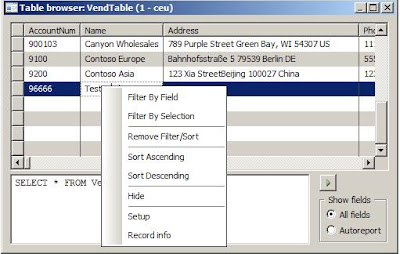
Step1 - Say, I want to delete a record from VendTable and later at some point of time I want to recreate it back. Right-Click the record and press Record info from the Context menu
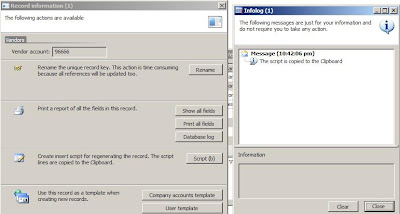
Step 2 - Click on Script button. This will generate an insert script of the record which you can use it for re-inserting the record back via say a job.
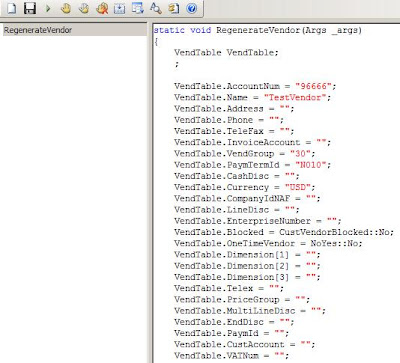
Step 3 - This is how the job looks like , I copied the script from clipboard in Step 2 and pasted it in my job editor
Step1 - Say, I want to delete a record from VendTable and later at some point of time I want to recreate it back. Right-Click the record and press Record info from the Context menu

Step 2 - Click on Script button. This will generate an insert script of the record which you can use it for re-inserting the record back via say a job.

Step 3 - This is how the job looks like , I copied the script from clipboard in Step 2 and pasted it in my job editor

Wednesday, January 28, 2009
Dynamics AX 2009 Enterprise Portal Update utility
AxUpdatePortal Command Line Utility
This comes with Dynamics AX 2009 SP1 which helps in deploying the additions/modifications made on EP web-sites. It can be done on all the EP web-sites on an IIS Server at one go.
The AxUpdatePortal utility is found in the following location on the IIS server on which Enterprise Portal is installed:
C:\Program Files\Microsoft Dynamics AX\50\Setup
When you run AxUpdatePortal.exe, it deploys the Web-related items from the AOT to every Enterprise Portal site on the IIS server. If you are running Enterprise Portal on multiple servers, you must run AxUpdatePortal.exe on each server.
The AxUpdatePortal.exe is run from a command line. The following examples show the common ways the utility can be run.
AxUpdatePortal
AxUpdatePortal -updateWebSites
AxUpdatePortal -verbose > "C:\EPUpdate.log"
AxUpdatePortal -iisreset
AxUpdatePortal -updateWebSites -verbose > "C:\EPUpdate.log"
If AxPortalUpdate.exe is run without parameters, it deploys the following items from the AOT to the IIS server. These items are deployed to each virtual server (port) on the IIS server.
More info, here
http://msdn.microsoft.com/en-us/library/dd261467.aspx
This comes with Dynamics AX 2009 SP1 which helps in deploying the additions/modifications made on EP web-sites. It can be done on all the EP web-sites on an IIS Server at one go.
The AxUpdatePortal utility is found in the following location on the IIS server on which Enterprise Portal is installed:
C:\Program Files\Microsoft Dynamics AX\50\Setup
When you run AxUpdatePortal.exe, it deploys the Web-related items from the AOT to every Enterprise Portal site on the IIS server. If you are running Enterprise Portal on multiple servers, you must run AxUpdatePortal.exe on each server.
The AxUpdatePortal.exe is run from a command line. The following examples show the common ways the utility can be run.
AxUpdatePortal
AxUpdatePortal -updateWebSites
AxUpdatePortal -verbose > "C:\EPUpdate.log"
AxUpdatePortal -iisreset
AxUpdatePortal -updateWebSites -verbose > "C:\EPUpdate.log"
If AxPortalUpdate.exe is run without parameters, it deploys the following items from the AOT to the IIS server. These items are deployed to each virtual server (port) on the IIS server.
More info, here
http://msdn.microsoft.com/en-us/library/dd261467.aspx
Tuesday, January 29, 2008
Tools - Addins - Source Code TitleCase Update
This is a handy option which will do proper case updation for class and method names. This is especially useful when you have long list of methods for your class and you need to update them with proper titlecase.
e.g. Go to AOT->
Once it is run, it will list an infolog with the changes which are done to the code.


Wednesday, November 28, 2007
Dynamics AX 4.0 - COM Class Wrapper Wizard
COM Class Wrapper Wizard is a great too to have. It easily creates wrapper classes to work with COM objects and also type safe when using dynamic binding.
How to use it from Morphx IDE:
Tools -> Development Tools -> Wizards -> COM Class Wrapper Wizard.
How to use it from Morphx IDE:
Tools -> Development Tools -> Wizards -> COM Class Wrapper Wizard.
Subscribe to:
Posts (Atom)