Total Pageviews

Search This Blog

Showing posts with label Dynamics AX 2012. Show all posts

Monday, April 10, 2017

How to get to the LCS Downloadable Tools Page

Quick tip - 

Recently, I was looking to download the security tools from LCS and I was not able to find the downloadable tools under the main menu of LCS

Had to type in the below url to get to the downloads page


Wednesday, August 10, 2016

Dynamics AX 2012 and SQL 2016 Support

Greetings Friends!

A quick post!

Microsoft has recently announced the support for AX 2012 with SQL Server 2016. This is exciting news as we have more possibilities integrating Dynamics AX 2012 with Power BI and Entity Store

Announcing support for Office 2016 and SQL Server 2016 with AX 2012 R3 and R2

Wednesday, January 20, 2016

How to Troubleshoot AOS Crash using Crash and Dump Analysis Tool from LCS

Friends,

This post is about my recent experience on how I went with troubleshooting the frequent AOS Crashes we encountered in one of the client's environment.

Pattern of AX Crash:

We have 4 AOS Servers, 2 of them dedicated to clients and rest of the 2 to share the load for Batches and SSRS Reports.

We had frequent crashes on the 2 AOS's which served the clients. 

How we knew it was a crash ?

Because when the crash happened, all of a sudden both the AOS Services goes into stopped mode - meaning they are no longer running and the users complain they can't connect to AX. It's very frustrating for the users as their application goes down when they are in the middle of something.

Some of the errors seen on the event logs were:

Displaying image005.png


LCS Crash Analysis comes to Rescue:

I came to know there's a cool utility available in LCS known as Crash Dump Analysis. Upon doing some search, I hit upon this interesting blog from MSDN which shows the steps to get started with Crash Analysis

Basically, Crash Dump Analysis is a tool which will help you to evaluate the reason for AOS crash.

The input needed for this tool is a mini dump file which is generated when the AOS crashes. We can think of this similar to a Windows mini dump file which gets generated when Windows OS crashes.

There are many tools available out there to generate the dump file and out of those, I tried WER

WER (Windows Error Reporting) 

WER is built into Windows 2008/2008 R2 can be configured to automatically create and store memory dumps from an AOS crash 

The configuration happens by making some Registry modifications, more concrete creating the following Registry Key:

HKEY_LOCAL_MACHINE\Software\Microsoft\Windows\Windows Error Reporting\LocalDumps\Ax32Serv.exe
In this new Registry Key several Registry Values have to be added as well (DumpFolder, DumpCount, DumpType, CustomDumpFlags).

Please note: 
Do NOT set the DumpType to 1 or 2, but set the DumpType to 0 and set CustomDumpFlags to 7015 decimal (0x1B67 hexadecimal). Invalid settings will generate dumps without the required information.

Below is a snapshot of how the registry looks after I made the change.


There's another good tool Debug Diagnostic Tool (v2) which can also be used to capture dump files. For more detailed insights, please refer to the instructions in this blog

I chose WER as there is no installation needed. It's just enabling some registry keys and it generates the crash dump file. Once a dmp zip file is generated, it serves as the input to your LCS Crash and Dump analysis tool.


A detailed step by step process to upload the dump file is shown here

Some tips when uploading the dmp file:

a. The dmp file needs to be in a zip format before it gets uploaded for analysis
b. I have observed when uploading large files one needs to keep an eye on the browser connection dropout. I just keep the browser active by clicking on the browser address bar


Once the file is uploaded and the analysis is done, it produces a html report. 

The report came with the following recommendations:

a. Recommended Kernel upgrade to CU9 - High risk (340 days old)
b. Recommended hotfixes to be applied related to AOS Crash
c.  Exception - Memory Access violation

In our case, the main reason for the crash was caused due to a Memory Access Violation and this was due to a custom SSRS report run by an user. We fixed that report and now no longer the crash occurs.

So, to conclude, next time when you come across an AOS Crash, it's highly recommended to try out the LCS Crash analysis tool to get to the root of the problem and fix it. Hope this post helps you in getting used to the Crash Analysis tool.

Wednesday, October 28, 2015

Anti-Virus Exclusions for SQL Server, SSRS and Dynamics AX AOS Servers for improved performance

This post is about sharing my experience where I helped some clients to improve their overall application performance.
Quite often I have seen, we neglect the anti-virus softwares which run on our production boxes and scan application and data files, thereby leading to disk I/O and performance issues.
We need to add an exclusion list in our Anti-Virus software to exclude scanning files for SQL, SSRS and Dynamics AX 
A. SQL Server: 

The following paths needs to be excluded:
Sqlserv.exe C:\Program Files\Microsoft SQL Server\MSSQL11.MSSQLSERVER\MSSQL\Binn

Full Text Index Catalog C:\Program Files\Microsoft SQL Server\MSSQL11.MSSQLSERVER\MSSQL\FTData
Data Files (.mdf/.ndf) D:\DATA (Path where SQL Database data files are located)

Log Files (.ldf) E:\Logs (Path where SQL Log files are located)

TempDB files F:\Tempdb (Path where tempdb files are located)
Backup Files (.bak, .trn) G:\Backup (Path where SQL Backup files are located)


B. SSRS Server :

ReportingServicesService.exe D:\Program Files\Microsoft SQL Server\MSRS11.MSSQLSERVER\Reporting Services\ReportServer\bin


C. Dynamics AX 2012 AOS Server :

Xppil folder C:\Program Files\Microsoft Dynamics AX\60\Server\AXPROD\bin\XppIL
Label files C:\Program Files\Microsoft Dynamics AX\60\Server\AXPROD\bin\Application\Appl

Thursday, October 22, 2015

Fix corrupt AX Install/Uninstall files using Microsoft Fixit

Greetings!

Got this error 1721 about Windows Installer when trying to do an uninstall of Dynamics AX 2012  R3 Client Visual Studio developer tools.


Solution:

The fix was to use Microsoft Fixit to do a clean uninstall. Refer to the link below


Wednesday, June 24, 2015

Troubleshoot Dynamics AX 2012 AIF Error The deployment web site was not found for the port

I was working on a custom service which I needed to activate on HTTP adapter, however was constantly hitting on this error while activating the service

Error - The deployment web site was not found for port


Fix -

The solution was to remove the end slash (\) from the service uri

System Administration > Setup > AIF > Website

Before: http://localhost:85/MicrosoftDynamicsAXAif60\

After: http://localhost:85/MicrosoftDynamicsAXAif60


I followed this blog which helped me to fix the issue
http://axaptapeople.blogspot.com.au/2013/11/ax2012-aif-known-issues.html


Thursday, March 5, 2015

How to consume ABN (Australian Business Number) or ACN web services from AX 2012 R3

Dear Friends,

Greetings!

Have been super busy with so much to do in so less time!

However, I wanted to take some time and post about my recent experience on how I went integrating ABN Web Service with AX 2012 R3 CU8.

In Australia, we have a concept of ABN and ACN numbers for business registration. ABN is for Australian Business Number and ACN is for Australian Company Number. These registrations are governed by ABR as they are the authority to issue the registration numbers and they maintain this database.

Now, let's get started.

First thing, you would need to go to the ABR site and register to use their webservices.
http://abr.business.gov.au/Webservices.aspx

Once the application is processed which happens within an hour they will e-mail you an authentication GUID (Globally Unique Identifier) which is required to access the ABN Lookup web services. Also with the email, they will send you a pdf which shows you how to access the webservice through various clients like C#, Java, VB6, MS Access etc

Next step, is to open Visual Studio, create a Windows Class Library project and reference the web service. Note, since this is classic web service (.asmx based), so just consume it via the web references node as shown

Web Reference - http://abr.business.gov.au/AbrXmlSearch/AbrXmlSearch.asmx?wsdl


Once this is done, next step is to deploy the Project to AOT (as shown below).


Now, back in AX you should be able to see your deployed project


Now, let's write some code.. Here is a simple job which I have used to pass a valid ACN number and it returns me the organisation name.

Output:


Sunday, March 1, 2015

Download Free Ebook Microsoft Azure Fundamentals

Dear All,

Microsoft Press has published a free Ebook on Microsoft Azure Fundamentals and it's worth reading to get a grasp on basics of Azure as we all know how important Azure is going to be especially in  line with Dynamics AX Ecosystem.

Link to Download the ebook below -

http://blogs.msdn.com/b/microsoft_press/archive/2015/02/03/free-ebook-microsoft-azure-essentials-fundamentals-of-azure.aspx


Enjoy Azuring ! :)

Sunday, September 21, 2014

Troubleshooting AX 2012 AIF Error The server has rejected the client credentials

Hello Friends,

Thought to share a recent troubleshooting experience with  AX 2012 AIF webservice when consumed through a different domain.

I wrote a Visual Studio Test application to connect to my AIF Service. From within the domain, I can consume the service without any errors. However, when my client program and services are on 2 different domains, I got this error

Error: The server has rejected the client credentials

Solution:

Just before invoking the AIF Service operations, try passing the Windows.ClientCredential through code
  
client.ClientCredentials.Windows.ClientCredential.Domain = "contoso";
client.ClientCredentials.Windows.ClientCredential.UserName = "Admin";
client.ClientCredentials.Windows.ClientCredential.Password = "pass@word1";

The other solution I tried was by creating a claims user as mentioned in fellow blogger Joris Gruyter's post here http://daxmusings.codecrib.com/2011/11/trusted-intermediary-in-aif-services.html

However, it didn't work in my scenario.


Wednesday, June 25, 2014

Tip - Troubleshooting voucher lines not getting printed on check in Dynamics AX 2012

Dear All,

Greetings!

This post is about an issue related to check Printing in AX 2012 which I successfully resolved for one of my client


Issue:

When you go AP > Journals > Receipt Journal and pay a vendor via CHQ (cheque), the voucher lines were not getting printed on the check report.


Solution:

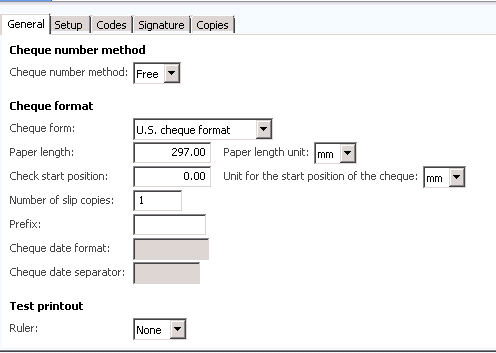
Upon debugging and some time spent in troubleshooting, the issue was related to a setup i.e. you would need to go to the bank Account setup for the bank account which you are using to pay the vendor

Go to  Cash and Bank Management > Bank Accounts > Select the bank account

Go to Setup > chequeNum and Number of slip copies set to 1

As I had thought before, The issue was a setup of the cheque slips on the bank account number, meaning

If we go to S000 > Cash and Bank management > Bank Accounts > Select Account No 370700 > Setup > Cheque (Note – previously the number of slip copies were 0, I changed it to 1. And then, the voucher lines started printing on the check.


Wednesday, April 2, 2014

Troubleshooting Tip Powershell how to delete CUS Model with a space in the name

Hi All,

Greetings!

Thought to share an useful time saving tip while writing Powershell scripts. I wanted to uninstall the default CUS Model in AX 2012 from one of my local development environments. And because of the space in the model name between the words CUS and Model I got this error

For sometime, I struggled with the below error as shown below.


Solution:

However the solution was to use the escape character (grave-accent) ` which is on the left hand side of your keyboard between CUS and Model as shown above.

i.e.

Uninstall-AXModel -Model CUS` Model


Wednesday, March 19, 2014

My notes on Dynamics AX 2012 R3 Pre-Release Event at Melbourne

Dear Friends!

Greetings, It's been a while doing some posting here.  Had been super busy. But I took some time to attend this event and thought to share some notes here.

Couple of days ago I went to attend the pre-release launch of Dynamics AX 2012 R3 here in Melbourne. Last year, Microsoft had a similar launch for R2, but it was not a full packed one. this year I was surprised to see almost more than 100 people turned up for the launch so I believe all are as excited as I am :)

I should have gone the social media way but preferred dotting some quick notes the traditional way on my laptop while the events were taking place

All in All, it was a good 2 hours event and we got to hear from Christian Pederson (General Manager of Dynamics at Microsoft)

Some of the keynotes were:

1/ The 4 Upcoming growth trends: a. Cloud Computing, b. Social media c. Mobility and d. Big Data

2/ A demo was shown on how Lotus F1 were taking advantage of Dynamics AX 2012 R3 to improve their overall factory processes in manufacturing race cars. It was good to get some knowledge on the business about how they change the car designs for each race lap, and how the computations and strategies are fed into Azure and Dynamics and ultimately how they got a better ROI

3/ Also an example was discussed about Delta airlines and how they are leveraging Dynamics AX 2012 R3 where flight attendants have windows mobile devices to take the requests and how every thing is integrated using Azure and Dynamics AX

4/ The key message was how Dynamics AX 2012 R3 can deliver amazing customer experiences through Engagement with the customer, Running Operations and finally Expansion

5/ There was an interesting note on how AX 2012 R3 + Big Data will influence the customer and Big Data is not all about external data but how we can leverage the technology for data generated internally within the organization as well

6/ There was a talk about how the future releases of Dynamics AX will come up with out of the box tools for Big Data reporting

7/ The key deliverable in R3 as what I understand from the demo is all about mobility and mobile apps. Microsoft demoed some of the out of the box apps for Expense Reporting and Shop Floor Tracking. Microsoft is encouraging to design and develop more and more mobile apps as this is where the next boom is

8/ Also another key deliverable is about the LifeCycle Services i.e. how the Project Manager, Business Analyst, Developer, Administrator can benefit from this new set of tools. For me, specifically I was interested in the System Diagnostics, Usage Profiler, Infrastructure Estimation, License Estimator tools and how they work together

9/ There was an interesting question from an audience re. the change in data model in R3 to which Microsoft confirmed there's no significant change in data model or structure in R3

To conclude, Dynamics AX 2012 R3 will be a big release in terms of development of mobile apps, Azure Deployment, Lifecycle services

I'm all excited and looking forward for the release happening in May 2014.


Sunday, February 16, 2014

Tip Dynamics AX Batch Execution and Using the NOLOCK hint to read SQL Server uncommitted data

Dear All,

Hope you are doing well.

I thought to share here a quick handy tip which I have been using for quite a while now.

Scenario:

I have a batch job running in AX which loads thousands of rows into some AX tables based on a csv/txt file. Quite often, I would like to know how many rows have been inserted into the tables.
There are many ways to get this but a quick way without much development effort is to use SQL Server Query Hint NOLOCK

Explanation:

For e.g. I'm loading some data into smmActivites table via an AX Batch and I would like to know ant any point of time how many rows have been inserted via my batch.

So, I execute the below query via SQL Management Studio

select COUNT(*) from SMMACTIVITIES WITH (NOLOCK) where DATAAREAID = 'n000'


The above statement will show me the no. of rows inserted into the table

What is the role of NOLOCK?

NOLOCK is a SQL Table hint which reads uncommitted data from database - meaning

Specifies that dirty reads are allowed. No shared locks are issued to prevent other transactions from modifying data read by the current transaction, and exclusive locks set by other transactions do not block the current transaction from reading the locked data.

You can read more about NOLOCK hint from the MSDN Documentation here http://technet.microsoft.com/en-us/library/ms187373.aspx

Note - Support for use of the READUNCOMMITTED and NOLOCK hints in the FROM clause that apply to the target table of an UPDATE or DELETE statement will be removed in a future version of SQL Server. Avoid using these hints in this context in new development work, and plan to modify applications that currently use them.

Saturday, February 15, 2014

Troubleshooting Error uploading Invoice Journals Number Sequence "0" does not exist

Dear All,

Greetings and it's been a while since I did some real posting. Had been very very busy with go live and new projects.

Recently for one of our clients, we have setup centralized payments where we raise invoice and pay them across different entities.

For one of our newly created entities, the business had an issue when do an upload of Invoice Journal.

Error: The number Sequence "0" does not exist.

Solution: I found that the issue was with the number sequence setup.


So, for e,g, in Entity B, when I go to the Number Sequence main setup form, there's a scope tab so the scope was pointing to Company A. Changed the scope and re-imported the invoice journal. Now it works like a charm!


Happy Daxing and see you around :)

Tuesday, January 7, 2014

Book Review - Microsoft Dynamics AX 2012 Reporting CookBook

Dear Readers,

Wish you all a Happy 2014!

Thanks once again to Packt Publishing to send me a copy of Microsoft Dynamics AX 2012 Reporting Cookbook to review.

I had a chance to go through this book and this is a well written book easy to understand practical examples which can be used on a day to day basis for developers who are authoring SSRS Reports.


About the Author

I know Kamal through his blogs and contribution to Dynamics AX Community. Kamal has a new blog here http://dynamicsaxlounge.com/ More about the author below


Kamalakannan Elangovan

Kamal has over eight years of development experience in Dynamics AX. He shares a passion for product development and has pioneered multiple ISV solutions on Dynamics AX. In the past he worked with Innovites to create the first multidimensional ISV solution for cable industries called "Innovites for cable". Building the solution from scratch, he has gained great insights into building, selling, and promoting the product among customers and partners in the Microsoft Ecosystem. You can learn more about him at http://about.me/casperkamal. He is enthusiastic about sharing his learning with the community which led him to create one of the first few blogs for AX in 2006. It is currently available at http://kamalblogs.wordpress.com. He is active through twitter and the community, popularly by his pseudonym Casperkamal.

Audience for this book

"Microsoft Dynamics AX 2012 Reporting Cookbook" is recommended for Dynamics AX developers and .NET-based SSRS developers looking to familiarize themselves with the AX reporting framework. A basic understanding of Morphx and X++ is assumed but the step-by-step instructions make it easy even for a beginner. Some examples use C# and VB.NET, so experience with Visual Studio is a plus, but not a must.

Overview (Highlights from this book)


  • Create and deploy reports
  • Understand the report programming flow
  • Modify the reporting framework
  • Create RDP-based reports
  • Design tabular matrix and chart-based reports
  • Debug reports, the reporting framework, and business logic
  • Migrate reports from the legacy reporting framework
  • Use web services, OLAP, and external data sources to create your report
  • Learn how to approach report modifications


You can find a detailed chapter coverage here http://www.packtpub.com/microsoft-dynamics-ax-2012-reporting-cookbook/book

To conclude, I would highly recommend this book for Dynamics AX 2012 SSRS Report Development


Thursday, November 14, 2013

Tip - SSRS Time Format functions for converting to am/pm

Dear Friends,

Sometime back I was working on few standalone SSRS reports which uses time fields from AX 2009 database like for e.g. smmActivities table and the time here is stored in form of integer values.

How to convert int field into time (am/pm)

=Format(TimeSerial(0,0,Fields!starttime.Value),"hh:mm:ss tt") - 12 hour clock
=Format(TimeSerial(0,0,Fields!starttime.Value),"HH:mm:ss tt") - 24 hour clock


Monday, November 4, 2013

Update - Integrating Dynamics AX 2012 with Sharepoint 2010 Workflow (Nintex) List using REST Services (Querying List data) - Part 1

Dear Friends,

I have come back and updated my previous blog with additional code on how to query the List data in Sharepoint using LINQ.

More here... http://daxdilip.blogspot.com.au/2013/10/blogpost-500-integrating-dynamics-ax.html

Soon, I will be writing Part 2 on how to create the journals in AX.

Keep reading...


Monday, October 28, 2013

Book Review - Extending Microsoft Dynamics AX 2012 Cookbook

Dear Friends,

Greetings!

Thanks to Packt team once again for sending me a copy of this wonderful book to review.


This is one of the best book which I have reviewed and written by one of the best in the game - Murray Fife

Introduction of the Author (from the book)

Murray Fife is a Microsoft Dynamics AX MVP, a presenter, and an author with over 18 years 
of experience in the software industry.

Like most people he has paid his dues as a developer, as an implementation consultant, 
and a trainer. He has a hard-to-find blend of technical and interpersonal skills and spends 
his days working with companies solving their problems with the Microsoft suite of products, 
specializing in Dynamics AX solutions

I'm sure most of us would have come across Murray's blog (www.atinkerersnotebook.com) or  SlideShare account (www.slideshare.net/murrayfife). I would recommend you to go through his presentations and blog, it's really helpful. 

Who this Book is for

This book is really a great resource and handy for AX developers/consultants who would like to take that extra advantage of integrating and extending Dynamics AX into their existing Microsoft stack of Sharepoint and SSRS/SSAS (Reporting and BI) tools. Likewise, if you have a Sharepoint or Reporting Team working with Dynamics AX team, they can as well leverage some of the knowledge from this book.

What to expect from this book

This book is filled with practical and do-it-yourself examples which one can leverage in their enterprise straightaway and get productive.

Some Highlights of the book:

* Extending with Sharepoint - Create document Libaries in sharepoint, Link the document library directly to AX Records

* A whole chapter is dedicated to Power View Reporting and integrating Power View Reports into Dynamics Ax forms and Role Centers - very cool

* More Reports, Dashboards, Scorecard, Charts etc

* Leveraging Unified communication via Lync 2010

* Organizing Workflows

* Reporting using Office Tools via Dynamics Add-In

* Create Help

* Use Infopath forms to consume Dynamics AX WebServices


Please refer the chapters of book over here http://www.packtpub.com/extending-microsoft-dynamics-ax-2012-cookbook/book?utm_source=networking.com&utm_medium=book&utm_campaign=book_networking


Conclusion

Overall, I really enjoyed going through this book and I would give it a full 5/5 rating. I recommend this book highly to anyone who is interested to utilize Dynamics AX and the surrounding Microsoft technologies to it's fullest. Once again kudos to Murray Fife for taking time and writing such a useful book.

Friday, October 18, 2013

BlogPost# 500 - Integrating Dynamics AX 2012 with Sharepoint 2010 Workflow (Nintex) List using REST Services - Part 1

Good day Friends!

This got to be my 500th blogpost and I'm excited ! :). Started blogging since Oct 4, 2007 and it's been a good learning experience over these 6 years! Thanks for your support which encourages me to continue blogging!

I had been super busy this last month with a Go Live Project and also have done some exciting work over the past few months with Sharepoint and Dynamics AX 2012 Integration.

I have build this windows service which polls every 10 mins a Sharepoint Nintex workflow based list and retrieves necessary information from a Sharepoint List using Sharepoint 2010 REST Services to create and post a Vendor Invoice Journal in Dynamics AX 2012.

I will try and cover this in couple of posts with code snippets as and when I go.

So, the process is:

a. Windows Service polling every 10 mins
b. Retrieve information from a Sharepoint based workflow
c. Create Vendor Invoice Journals in AX
d. Post Journals in AX
e. Updates the AX Journal Id, Status and other relevant information back into Sharepoint

Tools/Technologies used in this project:

a. Dynamics AX 2012
b. Visual Studio 2010 Windows Service Project (VB.Net)
c. Sharepoint Server 2010
d. Sharepoint 2010 REST Services

So, let's jumpstart. this code snippet below does the job of retrieving information from a Sharepoint based List, it looks for an item in the list which has status of "In Progress" and picks it up.


Let me explain how the code works:

1. Function GetSPListVendorInvoiceInfo is a VB.Net function (this is part of my Windows Service Project) and it looks into a sharepoint list and retrieves the individual item for e.g. Below is a sample of how my Sharepoint list looks like.


2. Next step, I grab the URI of my custom Sharepoint List via the REST webservice * by calling GetSPWorkflowUri()
<!--Sharepoint Workflow URI This is DEV URI Need to change for PROD Sharepoint URI--> <add key="WfUri" value="http://servername:portnumber/workflows-staging/_vti_bin/listdata.svc" />

*Note - I will cover the Sharepoint 2010 based REST Services for List items in a separate post.

3.  refitem = dc.WFLodgeClaim.
Expand("Reg").
Expand("Bu0").
Expand("Country1").
Where(Function(i) i.Status = "In Progress").FirstOrDefault()

Then, I use the above LINQ call to query the list filtering out only the items which has a status of "In Progress"

Please watch out for this space as there is more to come.....

Thursday, September 19, 2013

X++ Job List out Dynamics AX 2012 Security Role, Query and Policy

Dear Friends,

This is a test job I wrote a few weeks ago to list out my custom security policies, roles and queries associated with it into a table. Hope someone finds it useful.