Total Pageviews

Search This Blog

Showing posts with label Enterprise Portal. Show all posts

Wednesday, March 20, 2013

Applying Custom filters to Dynamics AX Enterprise Portal Grid

Dear All,

Hope you are doing well. 

Recently, I did an Enterprise Portal code upgrade for one of my customers. They are on Dynamics AX 2009 and as I was investigating, I found that the web forms of Dynamics AX 4.0 were not upgraded by their previous vendor, so I undertook the  task of  upgrading their 20+ web forms (Dynamics AX 4.0) to Dynamics AX 2009 web controls. 

I had to replace the existing standard filters which comes with EP AxGridView to custom textbox filters. And, for this reason I had to apply the filters via code. I got a good idea by seeing this useful blog on how to achieve it http://blogs.msdn.com/b/epblog/archive/2008/11/17/filtering-a-dataset-from-code-behind.aspx

There was a small hiccup while referencing FilterCondition and Typ as I didn't knew the namespace, so before we use the filterObject and conditionType objects, dont forget to declare the below highlighted namespace.

using Microsoft.Dynamics.Framework.Data.Ax;

Microsoft.Dynamics.Framework.Data.Ax.filterObject
Microsoft.Dynamics.Framework.Data.Ax.conditionType


Tuesday, March 12, 2013

Troubleshooting Tip Dynamics AX 2009 Enterprise Portal - Return of the Error An existing connection was forcibly closed by the remote host


Dear Friends,

Hope you are doing well.

Four years ago, I had an issue installing Enterprise Portal in a distributed environment mentioned in my blog post here.

The error is "An existing connection was forcibly closed by the remote host"

Fast forward to 2013, I'm helping a customer setup Enterprise Portal with SQL Server on a different box, and again hit the same error this time with SQL Server 2008 R2.

There's an article on technet about this error and troubleshooting http://technet.microsoft.com/en-us/library/ee355087(v=ax.50).aspx

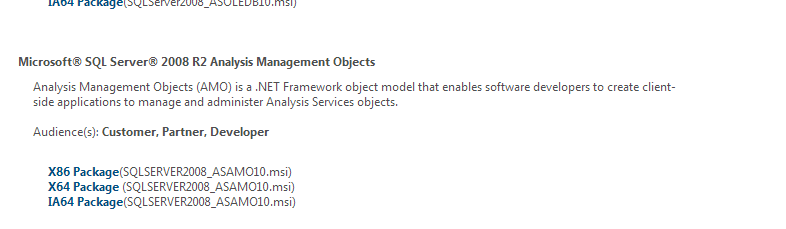
And, in the above link we have 2 solutions one for SQL Server 2005 and SQL Server 2008. In my current scenario, I'm on SQL Server 2008 R2. So, if you are on SQL Server 2008, Navigate to the below link to download the AMO Objects required to be installed on the EP box

http://www.microsoft.com/en-au/download/details.aspx?id=16978


Hope the above link and screenshot will help someone out there troubleshooting EP Setup.


Monday, February 11, 2013

Update - Facing Issue with Dynamics AX 2009 Enterprise Portal deployment

Update:

Finally, we figured out the issue. All The custom objects were successfully deployed but the role centers fooled us,  meaning we had to manually go to the role center page and Edit the web part zone and then attach the custom web menus

Thanks again to all of you for your helpful comments. Appreciate it.

Dear Friends,

Greetings!

This time it's not a solution but I'm stuck a problem which I thought to share here and get some responses. Any feedback welcome!

I'm at a customer place where they are on Dynamics AX 2009 SP1 and i'm n the process of building a TEST Instance of EP from a LIVE one.

I have performed the following:

a. Backup of Live AX Database and Restored it to TEST AX
b. Backup of Live AX Application and restored it to TEST AX
c. Setup AOS to point to TEST AX
d. Setup WSS 3.0 SP2
e. Create a new web app and site collection using Dynamics AX Enterprise Portal template
f. Run Dynamics Setup to install Role centers and enterprise portal without creating a new site i.e. by unchecking configure sharepoint and create a new site while going through the setup

All the above works, and later on I used Axupdateportalutility so that all the web customizations get deployed to TEST Instance, but this never happens, Although axupdateportal runs successfully and it writes everything in the log file which is around 300 kb and finally it says success.

But, none of the customized pages or role centers gets deployed to the test instance, The standard EP portal renders fine but the problem we have is with the custom pages. 

Initially we tried on a 64-bit Windows Server 2008 R2 with WSS 3.0 SP2 on it, but I found there are some issues like Manage deployment doesn't work, so we have to use axupdateportal from an elevated command prompt. I have done all the troubleshooting steps mentioned in the below blogs, but still no luck..


Lastly, we tried to replicate our LIVE Environment which is running on Windows 2003 and uses WSS 3.0, by following the steps mentioned above, but still no luck, everything works without any errors and log files seems ok. But. the custom pages and role centers just wont appear. I even tried copying the sharepoint IIS folders from LIVE to TEST (Especially the ones with control templates and layouts) but have hit a wall.

Any help on this matter much appreciated. Thanks for your patience and reading it through. Cheers


Sunday, August 21, 2011

Step by Step Guide How to Install Dynamics AX2012 Enterprise Portal

How to Install Dynamics AX2012 Enterprise Portal

This is the second post in the series of installing Dynamics AX2012 Components. You can refer to the first post here - (Installing the base Dynamics AX Components - Databases, AOS, Client, Debugger, Office Addins)

http://daxdilip.blogspot.com/2011/08/step-by-step-guide-how-to-install.html

This post will talk about installing Dynamics AX2012 Enterprise Portal.
The basic pre-requisite for Installing Enterprise Portal is Sharepoint 2010 Foundation/Sharepoint 2010 Server

Since this is sandpit/training box, I would be just installing Sharepoint Foundation 2010.

i. Install the Sharepoint 2010 Pre-Requisites shown below


ii. Pre-Requisites Installed Successfully

iii. Now, start with the Foundation Installation

iv. Run the Sharepoint Configuration Wizard
v. After all the tasks are completed successfully, you are welcomed to the Sharepoint Team site


Tip - If you are planning to Install Sharepoint 2010 on Windows 7, please see the steps here which I posted a while ago - http://daxdilip.blogspot.com/2009/11/how-to-install-and-configure-sharepoint.html

Installing Dynamics AX2012 Enterprise Portal

i. Now, let's go ahead and install Enterprise Portal Component. Run the setup and click Next


ii. Check the Pre-Requisite Validation runs fine and then move next


iii. Enter the .Net BC Connector Information
iv. Configure the website, I just left the defaults as it is and moved next
v. Move next with the installation


vi. Encountered an error at this step


Looked at the error log file which came up, and found the below logs:

Error: Windows cannot find the local profile and is logging you on with a temporary profile. Changes you make to this profile will be lost when you log off.
Installation completed successfully, but Setup could not create the Enterprise Portal website. You can create the website by running Setup and installing Enterprise Portal again. You can also manually create a website using SharePoint Central Administration.


An error occurred during setup of Enterprise Portal (EP).
Registering tracing manifest file "C:\Program Files\Microsoft Dynamics AX\60\Server\Common\TraceProviderCrimson.man"
WEvtUtil.exe install-manifest "C:\Users\itadmin.PASPALEY\AppData\Local\Temp\tmpA5A1.tmp
**** Warning: Publisher {8e410b1f-eb34-4417-be16-478a22c98916} is installed on
Troubleshooting:
Didn't spent much time on troubleshooting this one as I have seen this error of logging with temporary profile before, but not with EP. The simplest solution which worked for me was to restart the box , login back and run the Enterprise Portal Setup again and that fixed the issue.


Finally, the Role center page arrives :-)... I can recall my pervious experience with  Dynamics AX 4.0 and 2009 version, never I was able to install MOSS and Enterprise Portal at the first go successfully without too many hiccups.


Additional Tip/Note -
Installation of Sharepoint Foundation 2010 Creates a new SQL Server named instance for e.g. In this case TEST-DEMOAX2012/Sharepoint where all sharepoint related databases can be found


Wednesday, June 8, 2011

Tip – EP Customization ( Dynamically Loading Report Folder from Network based on Store Parameter)


Overview
I had this requirement where based on the logged in Store Number, the user should be able to open the corresponding Report Store Folder (located in an UNC Network Path) from Enterprise Portal web page

Solution/WorkArounds:
Initially, tried writing a separate web part which loads a .Net File Dialog user control box but it was turning out to be complex so left the approach as time was limited
Then, tried the out of the box Page Viewer Web Part but it has the limitation wherein you can't dynamically load the network path and in order to attain it, one needs to write a custom Dynamic Page Viewer Web Part which is another time consuming and complex customization.
After some investigation, I found a much simpler way to achieve this.
  1. Wrote a dynamic Java Script which queries the Network Path from AX Table
  2. Pass the store parameter to it
  3. Loads the UNC Path dynamically on the fly based on the store parameter
This is the code segment which picks up the Network Path and then dynamically appends the store id to it based on the logged in user's store id profile

  
Tip: Initially, I was using the ClientScript.RegisterStartupScript method to register the script block but landed into the same issues this bloke was facing when trying to load from webpartzone.
, ScriptManager came to my rescue here.
Below is the button in action on our portal Site (Role Center Page) which loads the network Report path
   

Tuesday, February 22, 2011

Dynamics AX 2009 Role Center Migration Issues

In our Project, we have around 40 approx. custom role center pages and we have to often do a deployment from DEV to other environments. In this process the web part pages come up, but the Quick Links don't turn up properly.


DEV

This is how the role center page looks in DEV


UAT (After Migration) – This is how it looks like after we migrate, The issues here are:


  1. My Reports Label Description coming as "Quick Links Web Part[1]"
  2. All the Links in My Reports not showing up after migration
  3. My Links Label Description coming as "Quick Links Web Part[2]"
  4. Desktop Links (hidden) ones not getting migrated properly to UAT
 
Migration Process: (These are the steps carried out to migrate the role center page from DEV)

  1. Export Page Definition and Web Menu Url for the specific Role Center Page from AOT > Web > Page Definitions
  2. Import Page Definition into UAT
  3. Deploy Page Definition from UAT
  4. Export Cues and Links by choosing the option Export to AOT
  5. Export the whole Cues and Link from AOT as xpo
  6. Import the Cues and Link from AOT
  7. IISReset in UAT

Please note that I'm using axupdateportalutility when we have to do a full migration but for partial migration like one or two role center pages we follow the above steps. Even when I do an axupdateportalutility for full migration, still we have these issues of missing links.

 
The current workaround for this is either to go manually and add the links in each environment or I usually write a sql script which updates the sysquicklinks table at the database level.
Does anyone else facing the same issue and how to resolve it in AX way? Any responses appreciated.


Saturday, February 5, 2011

Troubleshooting Dynamics AX 2009 EP Thread abort Exception Error

Issue:
We had this problem where all of a sudden some of the EP Users were not able to navigate through the EP pages.


Below is the snapshot of the error which comes up in the EP Page. Sharepoint as usual doesn't show informative/descriptive errors and it's quite difficult to debug sharepoint pages, so my next bet was to look into Event Viewer to get a more detailed description of the error.


Event Viewer Log:


Dynamics Object Adapter Call failed Thread was being aborted
System.Threading.ThreadAbortException
   at AxCore_Call(UInt64 , Char* , tagVARIANT* , Int32 , tagVARIANT* )
   at Microsoft.Dynamics.BusinessConnectorNet.AxaptaObject.Call(String methodName, Object[] paramList)
   at Microsoft.Dynamics.Framework.BusinessConnector.Session.DynamicsObjectAdapter.Call(String methodName)


Microsoft Dynamics AX Business Connector Session 444.

Thread was being aborted.
   at AxCore_Call(UInt64 , Char* , tagVARIANT* , Int32 , tagVARIANT* )
   at Microsoft.Dynamics.BusinessConnectorNet.AxaptaObject.Call(String methodName, Object[] paramList)


Session Release for Microsoft Dynamics failed.


No .NET Business Connector session could be found.


Microsoft.Dynamics.Framework.BusinessConnector.Session.Exceptions.NoKernelSessionException
   at Microsoft.Dynamics.Framework.BusinessConnector.Session.DynamicsSession.get_AxaptaAdapter()
   at Microsoft.Dynamics.Framework.Portal.AxWebSession.WebSessionClientRemove()
   at Microsoft.Dynamics.Framework.BusinessConnector.Session.DynamicsSession.Release(ICacheContext context)


Resolution


Fristly, I googled to see if somebody else has experienced similar error, found this link

 http://graycloud.com/axapta/enterprise-portal-failed-with-dynamics-net-business-connect-t51380.html,
it's the same issue but there's no solution.

I tried IISreset from the EP server but that didn't help. Opened AX and deleted the user cache but still this didn't help, finally had to delete and recreate the user to solve the problem, We are on the latest service pack and rollup 6 for Dynamics AX 2009 so I'm not sure if this is a bug which would be addressed in the future.


Saturday, December 4, 2010

Fiddler - Good tool to check EP web page, custom websites, performance and AIF Web services

Recently, I was evaluating some tools for troubleshooting performance related to EP web pages.

I just bumped upon this site to find some great tools for testing performance of webpages, websites, sharepoint sites etc.

http://blogs.msdn.com/b/sanjaynarang/archive/2009/04/18/sharepoint-performance-stress-load-testing.aspx


Out of the links in the browser add-ons, I evaluated Fiddler   http://www.fiddler2.com/Fiddler2/firstrun.asp and it's quite handy, after installation it sits quietly in the browser window and then each page you load, it will show you the statistics in terms of how much time each functionality took to load, like web controls, web menus etc.

Good handy tool for any website debugging, Also with AIF Web Services, it shows you the xml sent between calls.

Monday, October 25, 2010

Dynamics AX 2009 EP Error Could not load Enterprise Portal tools

My Visual Studio EP Projects were working fine and one fine day all of sudden when I'm trying to open my EP Project, it throws back an error saying " No .Net Business Connector Session found, Install Enterprise Portal tools".
I checked my installation for Enterprise Portal tools by running the setup program and they were all there. I copied the Visual Studio Project and web templates from another user's profile thinking my profile would have been corrupted but still with the same issue. Went through the event viewer and saw these entries


Checked the .Net business connector configuration and it was fine. After some troubleshooting, deleted the registry key for .Net Business Connector and reimported it again from the AX Config and this worked! 


Saturday, July 31, 2010

Dynamics AX 2009 Enterprise Portal Web Form Converter to Web User Controls

Thought I would share with you this useful link which I accidentally bumped into while doing some search on EP. This is useful if you have want to convert Dynamics AX 4.0 Web Forms to the latest Dynamics AX 2009 Web User Controls.

http://msdn.microsoft.com/en-us/library/cc615339.aspx

Intro
The SysEPWebFomConverter class contains several methods that are used when you convert a Web form from an earlier version of Enterprise Portal to the components used with the ASP.NET-based framework. To use this class, save the text of the export file as an .xpo file. Import the .xpo file into the AOT. For details about how to use the methods in the class to convert Web Forms

How do Convert
Read here, more about the conversion http://msdn.microsoft.com/en-us/library/cc620983.aspx

Verify
And at the end you can verify if the conversion succeeded by http://msdn.microsoft.com/en-us/library/cc619852.aspx

Troubleshooting AX 2009 Enterprise Portal Error The type or namespace name "Portal" does not exist in namespace 'Microsoft.Dynamics'

These days, I'm working on developing some new Enterprise Portal pages for creating Inventory Journals and Posting it through EP.

From last couple of weeks, my enterprise portal site on my local virtual image was working fine but suddenly last week it stopped working, I don't know for what reason but it started giving me weird errors like "The type or namespace name 'Portal' does not exist in the namespace 'Microsoft.Dynamics' (are you missing an assembly reference?) " on some of my custom developed pages.

Resolution: This thread on the communities forum helped me as I had to Generate the proxies again and build the pages again.

http://www.microsoft.com/communities/newsgroups/en-us/default.aspx?dg=microsoft.public.axapta.programming&tid=713a2ca4-60cb-4fc5-9e7f-bb5b8a6f8440&cat=en_US_43057844-26db-48ec-8f54-3dff8e8cfd2f&lang=en&cr=US&sloc=&p=1

Wednesday, July 21, 2010

Dynamics AX 2009 Home Page Icon Missing and Role Center not loads up

Issue
Some days back, we had this issue where suddenly the Home Page icon vanished from our DEV environment and the role center page won't load up in Dynamics AX thick client.

Resolution

1. Googled the issue and thanks to Brandon my friend who experienced similar problem and highlighted it in his blog http://dynamics-ax.blogspot.com/2010/06/dynamics-ax-2009-home-page-icon-missing.html

2. But unfortunately, the above troubleshooting step didn't apply in my case, as the upgrade checklist was up to date, but it definitely helped me as it gave me a clue to check out the EPGlobalParameters Table

3. Opened the ECPGlobalParameters table in AOT and found that the GUID for the URL was pointing wrongly to some another EP site.

4. Updated the GUID to point it to the correct EP Website and that did the trick!

Thursday, May 13, 2010

Query on EP Developer Tools

We are setting up DEV Environment for our EP Portal Development on Dynamics AX 2009.

We would be using EP extensively in our project as we are building up some store portals web pages. Currently, our environment topology for DEV is that we have different servers for AOS and EP and Role Centers respectively. We have around 15 developers who would be using their individual machines to build up Enterprise portal pages, these guys have Windows XP running on their local pc’s with Visual Studio.
Hence, we are trying to install the EP Developer tools on their machines but the setup can’t proceed as it expects EP and Role Center to be installed on the same physical machine where we are installing Developer Tools.


Logically, I think it should be only the BC.Net which should be installed on client machines along with the DEV tools as the BC.Net knows which AOS to talk to and thereby EP and Role Centers. But, this is not working.

Can anyone enlighten me if any workaround or any solution/fix is available for this? I would appreciate if you can drop a comment here or mail me on mail.dilipn@gmail.com. If I find an answer, I will post it back here.

Thursday, February 4, 2010

Running Multiple Instances of EP on Single Machine

These days, I was looking to collect some information for configuring multiple instances of EP on a single server. e.g. running DEV and TEST EP on the same box as many clients dont have the bandwidth or budget for having 2 separate servers for both. Here's a great piece of information from Mey MeenakshiSundaram about running multiple instances of EP on the same server. Thanks Mey for the great post. It's written for Dynamics AX 4.0 but I believe this should work for Dynamics AX 2009 as well.


https://blogs.msdn.com/solutions/archive/2006/09/11/ep-configuration-single-web-server-multiple-aos-installations.aspx

Tuesday, October 30, 2007

How to Enable X++ debugging for Dynamics Ax 4.0 Enterprise Portal

To enable X++ debugging in the current user session in Microsoft Dynamics AX 4.0, follow these steps:

1. On the server that is running Internet Information Services (IIS), open a console session (also known as session 0). To use Terminal Server to do this, click Start, click Run, type mstsc /console in the Open box, and then click OK. Then, start Microsoft Dynamics AX 4.0 in the Terminal Server session.

2. Set the .NET Business Connector configuration and the client configuration to enable breakpoints when you run the Business Connector. To do this, follow these steps:
a. Click Start, click Run, type Control admintools, and then click OK.
b. Double-click Microsoft Dynamics AX Configuration Utility.
c. In the Configuration target list, click Business Connector (Non-interactive use only).
d. On the Developer tab, click to select the Enable user breakpoints to debug code running in the business connector check box and the Enable global breakpoints to debug code running in the business connector check box.
e. Click Apply. Then, click OK.Repeat step a through step e for the local client configuration in the Configuration target list.

3.Enable debug mode. To do this, follow these steps:
a.On the Tools menu, click Options.
b.Click the Development tab.
c. In the Debug mode box, click When Breakpoint.
d. Click Apply, and then close the Options dialog box.

4.Locate the code that you want to debug. Before the code that you want to debug, type the keyword breakpoint.

5.Manually start the debugger. To do this, click Tools, point to Development tools, and then click Debugger.

6.Enable desktop interaction for the World Wide Web Publishing Service. To do this, follow these steps:
a. Click Start, point to All Programs, point to Administrative Tools, and then click Services.
b. Right-click World Wide Web Publishing Service, and then click Properties.
c. Click the Log On tab.
d. Click to select the Allow service to interact with desktop check box.
e. Click OK to close the World Wide Web Publishing Service (Local Service) dialog box.

7. Make sure that the user who is logged on to the computer is one of the following users:
•The user who is running the Web application pool
•The user who starts a session in Microsoft Dynamics AX 4.0
•The user who set up breakpoints in Microsoft Dynamics AX 4.0