Total Pageviews

Search This Blog

Showing posts with label Dynamics AX 2009. Show all posts

Friday, August 14, 2015

Troubleshooting Dynamics AX 2009 Enterprise Portal Unable to generate a temporary class

Recently, I bumped on this error while troubleshooting a webpart in AX 2009

Error

Server was unable to process request. ---> Unable to generate a temporary class (result=1).
error CS2001: Source file 'C:\WINDOWS\TEMP\vmeyu2da.0.cs' could not be found
error CS2008: No inputs specified


Solution:

Give the app pool iis account read/write permissions to c:\windows\temp folder

Sunday, June 23, 2013

Book Review - Dynamics AX Performance Optimization Guide

Dear Friends,

This post has been due from my end for a while now. First of all, I would like to thank Martin Zhen and Daniel Liao for shipping me the hard copy of the book from China.

Introduction of the Authors:

Martin Zhen started as a Dynamics AX developer in 2004. His focus has primarily been on performance, working on architecting, developing, and tuning Dynamics AX applications.
 
Daniel Liao has been working with AX since 2004.  Currently, he is managing an offshore development team in China that specialize in providing a complete set of offshoring services around the Microsoft Dynamics AX and .Net development services.


"Dynamics AX Perfomance Optimization Guide" - This book lives upto it's name and I would recommend it as an excellent resource and a handy guide to troubleshoot performance related issues to Dynamics AX and SQL. This book is targeted towards the technical audience.

Alongwith Dynamics AX, this book covers advanced troubleshooting tips with SQL Server which many of us might have not known before.

This book spans approx. 200 pages and it's divided into 8 chapters:

1. Understanding Dynamics AX - covering Dynamics AX Architecture, Sessions, Concurrency Control

2. Monitoring Hardware, Database and Dynamics AX - Touches on the key areas like Hardware Monitoring, Database Monitoring, Database I/O, Monitoring Dynamics AX

3. Setup and Configuration - This chapter extensively covers from a SQL Server perspective like Recovery models, Files and File Groups, SQL Server configuration, Database options

4. Common Dynamics AX performance problem - Disk I/O Bottlenecks, Memory Bottlenecks, Extensive Logging, Deadlocking

5. Optimizing Dynamics AX SQL Statement - Index Hints, Trace flags, Best Development Practices, Buffer and Caching mechanisms are covered in this chapter

6. SQL Server Performance and Compilation Optimizations for Dynamics AX - Resource Management, Auditing and Compliance, Performance Monitoring , Query Optimizations and Hardware Optimizations

7. Database Maintenance - Managing Indexes and Locking

8. Infrastructure and Hyper - V virtualization - Hardware Sizing, Sizing guidelines for Dynamics AX 2012 and 2009, Dynamics AX Server Virtualization benefits, Hyper-V best practices

As you might have already seen by now, this book covers extensively SQL Troubleshooting which i think is very critical to understand while dealing with performance issues. I think every technical person developing in Dynamics AX should have a good understanding of SQL Server from an administrative point of view and this book exactly does that. Whether you are a newbie in AX Development or an experienced developer, there's a lot to learn from this book.

I really appreciate Martin and Daniel for the effort they have put behind this book and I would recommend every technical person to grab a copy of the book if they could. Good job guys!

If you like to order a copy of this book, kindly go to this link http://www.amazon.com/Dynamics-Performance-Optimization-Guide-Microsoft/product-reviews/1481100750

Wednesday, March 20, 2013

Applying Custom filters to Dynamics AX Enterprise Portal Grid

Dear All,

Hope you are doing well. 

Recently, I did an Enterprise Portal code upgrade for one of my customers. They are on Dynamics AX 2009 and as I was investigating, I found that the web forms of Dynamics AX 4.0 were not upgraded by their previous vendor, so I undertook the  task of  upgrading their 20+ web forms (Dynamics AX 4.0) to Dynamics AX 2009 web controls. 

I had to replace the existing standard filters which comes with EP AxGridView to custom textbox filters. And, for this reason I had to apply the filters via code. I got a good idea by seeing this useful blog on how to achieve it http://blogs.msdn.com/b/epblog/archive/2008/11/17/filtering-a-dataset-from-code-behind.aspx

There was a small hiccup while referencing FilterCondition and Typ as I didn't knew the namespace, so before we use the filterObject and conditionType objects, dont forget to declare the below highlighted namespace.

using Microsoft.Dynamics.Framework.Data.Ax;

Microsoft.Dynamics.Framework.Data.Ax.filterObject
Microsoft.Dynamics.Framework.Data.Ax.conditionType


Tuesday, March 12, 2013

Troubleshooting Tip Dynamics AX 2009 Enterprise Portal - Return of the Error An existing connection was forcibly closed by the remote host


Dear Friends,

Hope you are doing well.

Four years ago, I had an issue installing Enterprise Portal in a distributed environment mentioned in my blog post here.

The error is "An existing connection was forcibly closed by the remote host"

Fast forward to 2013, I'm helping a customer setup Enterprise Portal with SQL Server on a different box, and again hit the same error this time with SQL Server 2008 R2.

There's an article on technet about this error and troubleshooting http://technet.microsoft.com/en-us/library/ee355087(v=ax.50).aspx

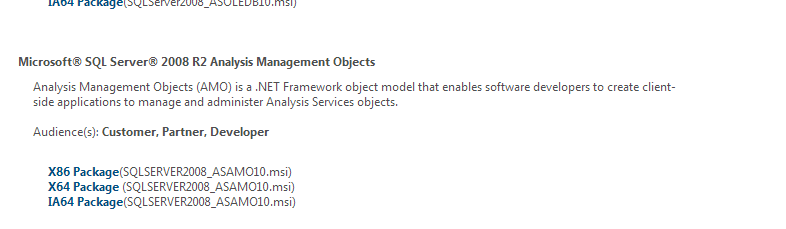
And, in the above link we have 2 solutions one for SQL Server 2005 and SQL Server 2008. In my current scenario, I'm on SQL Server 2008 R2. So, if you are on SQL Server 2008, Navigate to the below link to download the AMO Objects required to be installed on the EP box

http://www.microsoft.com/en-au/download/details.aspx?id=16978


Hope the above link and screenshot will help someone out there troubleshooting EP Setup.


Wednesday, February 20, 2013

About SysListPanelRelationTable Class in Dynamics AX

Hi there!

Recently for one of my clients, I built a custom SSRS Security Maintenance form for their Financial Reporting.

The requirement was to built a custom security form wherein the users were mapped to Financial Dimensions (also known as Programs in our client's terminology)  and the security should flow into SSRS Reporting so that the programs are automatically filtered based on the user's login.

Ok, so the main point I want to highlight here is when I was developing this form, I leveraged the class SysListPanelRelationTable in AX. You can have a look in AOT/Forms/Tutorial_ListPanel to see how the class is implemented. The other example of this class implementation is Standard AX User/User Groups form in Administration menu.


So, in my implementation I used the same class, however the tables I used were different i.e my own custom table and standard Dimension Table, The key here to understand is the table and field relationships while passing them as parameters to the newForm constructor

Monday, February 11, 2013

Update - Facing Issue with Dynamics AX 2009 Enterprise Portal deployment

Update:

Finally, we figured out the issue. All The custom objects were successfully deployed but the role centers fooled us,  meaning we had to manually go to the role center page and Edit the web part zone and then attach the custom web menus

Thanks again to all of you for your helpful comments. Appreciate it.

Dear Friends,

Greetings!

This time it's not a solution but I'm stuck a problem which I thought to share here and get some responses. Any feedback welcome!

I'm at a customer place where they are on Dynamics AX 2009 SP1 and i'm n the process of building a TEST Instance of EP from a LIVE one.

I have performed the following:

a. Backup of Live AX Database and Restored it to TEST AX
b. Backup of Live AX Application and restored it to TEST AX
c. Setup AOS to point to TEST AX
d. Setup WSS 3.0 SP2
e. Create a new web app and site collection using Dynamics AX Enterprise Portal template
f. Run Dynamics Setup to install Role centers and enterprise portal without creating a new site i.e. by unchecking configure sharepoint and create a new site while going through the setup

All the above works, and later on I used Axupdateportalutility so that all the web customizations get deployed to TEST Instance, but this never happens, Although axupdateportal runs successfully and it writes everything in the log file which is around 300 kb and finally it says success.

But, none of the customized pages or role centers gets deployed to the test instance, The standard EP portal renders fine but the problem we have is with the custom pages. 

Initially we tried on a 64-bit Windows Server 2008 R2 with WSS 3.0 SP2 on it, but I found there are some issues like Manage deployment doesn't work, so we have to use axupdateportal from an elevated command prompt. I have done all the troubleshooting steps mentioned in the below blogs, but still no luck..


Lastly, we tried to replicate our LIVE Environment which is running on Windows 2003 and uses WSS 3.0, by following the steps mentioned above, but still no luck, everything works without any errors and log files seems ok. But. the custom pages and role centers just wont appear. I even tried copying the sharepoint IIS folders from LIVE to TEST (Especially the ones with control templates and layouts) but have hit a wall.

Any help on this matter much appreciated. Thanks for your patience and reading it through. Cheers


Wednesday, January 16, 2013

Side-By-Side Comparison of Budgeting features Dynamics AX 2009 vs Dynamics AX 2012

Dear Friends,

Hope you are having a good start to this Year 2013.

Thought to share with you Budgeting functionality differences between between Dynamics AX 2009 vs 2012. Below are the key areas which I have documented. Feel free to send your comments if you have any additions or modifications to this list. Thanks and Happy Budgeting with Dax 2012 :)

Budget manager/analyst role center 

Goal
Dynamics AX 2009
Dynamics AX 2012
Importance
Perform common tasks, and view frequently used forms and reports from a single location
NA
Provides access to the commonly used forms, fact boxes, charts, reports, activities, and work items that the budget manager needs to complete daily tasks and make informed decisions
Consolidates key forms and information in a single location

 Financial dimensions for budgeting and budget control

Goal
Dynamics AX 2009
Dynamics AX 2012
Importance
Select financial dimensions in the chart of accounts for budgeting
Users were allowed a limited number of financial dimensions
Include or exclude specific dimensions, including main accounts, for budgeting
Simplifies budgeting and account number entry
Select dimensions from the account structure in the chart of accounts for budget control
Budget was always available at a main account level with the option of adding dimensions
Specify dimension values to hold budget amounts without any regard to their specific usage in main accounts
Provides flexibility in selecting specific dimensions, including main accounts, for budget control

 Budget Rate Types and Exchange Rates

Goal
Dynamics AX 2009
Dynamics AX 2012
Importance
Create a budget rate type and associate exchange rates
NA
Define currency pairs and associate exchange rates with the default budget rate type for the ledger
Simplifies creating and maintaining exchange rates specifically for budgets

Budget Models

Goal
Dynamics AX 2009
Dynamics AX 2012
Importance
Identify a budget by associating it with a budget model
Budget models were used to identify budgets
Budget models can be used to identify budgets
Simplifies categorizing budget transactions, identifying budgets, and assigning budget cycles
Use budget models to structure ledger budgets and develop budget forecasts
Budget models were used for simulations and forecasts
Budget models can be used for simulations and budget forecasts
Run simulations and compare budget forecasts
Build complex budget models using submodels for planning and reporting
Budget models and submodels were used to aggregate budget amounts
Submodels can represent departments or variety of other organization entities
Provides flexibility in budget planning and the ability to produce reports with consolidated balances

Budget Cycles

Goal
Dynamics AX 2009
Dynamics AX 2012
Importance
Create a budget cycle time span with one or more budget cycles that can be used across legal entities
NA
Map the budget cycle time span to a fiscal year or determine the number of accounting periods that each budget cycle will represent
Provides flexibility in implementing budget control for part of a fiscal year or over one or more fiscal years

 Budget Control Configuration

Goal
Dynamics AX 2009
Dynamics AX 2012
Importance
Define parameters and dimensions for budget control
NA
Dimensions and default parameters for budget control are defined in one location
Centralizes budget control options
Select the default over-budget permissions for user groups
NA
Users can determine the amounts to add and subtract for the calculation that determines the budgets funds that are available
Simplifies customization of the calculation for the budget funds that are available
Determine the source documents and accounting journals for budget control
NA
Enables budget checking for source documents and account journals at a header level or at line item entry
Controls processing of the specified source documents and accounting journals
Assign budget models to budget cycles and budget cycle time spans
NA
Implement one or more budget models and budget cycles so that, for example, a capital expenditure budget model and an operating budget model could be used for budget control
Provides flexibility in implementing budgets
Define budget control rules
NA
Defines of rules for specific dimensions, over-budget permissions, and parameters
Provides flexibility in defining dimension values and parameters for budget control
Select main accounts for budget control
NA
When main account is not selected as a budget control dimension, users can select specific main accounts for the application of budget control rules
Facilitates implementation of budget control for dimensions and main accounts
Define budget groups
NA
Set up budget checking for pooled dimensions and accounts
Provides flexibility in implementing budget control for dimensions and dimension values
Edit, activate, restore and turn on the budget control configuration
NA
Users can control the active budget control configuration as well as edit a draft version
Simplifies the implementation and administration of budget control

 Budget control on source documents and accounting journals

Goal
Dynamics AX 2009
Dynamics AX 2012
Importance
Enable budget checks as line items are entered or postpone the budget check until an action, such as an approval, is taken on the source document
NA
Source documents include purchase requisitions, purchase orders, vendor invoices, travel requisitions, and expense reports
Controls or prevents over-budget processing
Enable budget checks as each general journal line is entered or postpone the budget check until the journal is posted
NA
Accounting journals include daily journals, allocation journals, project expense journals, and fixed asset journals
Controls or prevents over-budget processing

 Budget register entries

Goal
Dynamics AX 2009
Dynamics AX 2012
Importance
Use budget register entries to formulate and manage budgets
Ledger budget tables provided static storage for budget records
Define one or more codes for the following budget transaction types: original budget, transfer, amendment, encumbrance, pre-encumbrance, carry-forward, project, fixed assets, demand forecast, supply forecast, apportionment (Public sector), and preliminary budget (Public sector)
Provides the ability to track, categorize, and audit budget transactions
Use subledger budget transaction types when budget forecasts are transferred to the general ledger
Users were unable to track the transfer of budgets from subledgers to the general ledger
Transfer forecasts for projects, fixed assets, demand forecasts (inventory sales), and supply forecasts (inventory purchasing)
Simplifies the transfers of forecasts to the ledger
For public sector, use preliminary budgets and apportionment budgets
NA
Define codes for apportionment and preliminary budget transactions
Provides public sector organizations with the ability to use preliminary budgets for budget control and apportion part of an approved budget
Create posting definitions for budget transactions
NA
When budget transactions are processed, posting definitions can create ledger entries for multiple accounts
Budget transactions can be automatically posted to the ledger

 Workflow for budget transactions

Goal
Dynamics AX 2009
Dynamics AX 2012
Importance
Set up budget transaction workflows
NA
Budget transactions associated with the workflow are automatically routed for review
Simplifies routing and reviewing budget transactions

 Budget transfer rules

Goal
Dynamics AX 2009
Dynamics AX 2012
Importance
Define budget transfer rules
NA
Budget transfer rules determine when budget transfers between dimensions can occur
Facilitates and controls budget transfers

 Budget transfers, allocations, and recurrences

Goal
Dynamics AX 2009
Dynamics AX 2012
Importance
Transfer budget amounts
NA
With budget control turned on, users can transfer budget amounts while entering other budget transactions or from source documents and accounting journals
Provides flexibility in transferring budget amounts
Allocate budget funds by dimension or period
Users could only allocate funds by period or dimension during budget entry
Spread a budget amount across dimension values or fiscal periods using a single transaction
Simplifies creation of budget allocation transactions
Enter a recurrence pattern for budget transactions
Users could create recurring budget expenses
Create recurring budget transactions
Simplifies creation of recurring budget transactions

 Budget reports and inquiries

Goal
Dynamics AX 2009
Dynamics AX 2012
Importance
Use reports and inquiries to view budget transactions, budget control statistics, and budget funds
Actual versus budget report
Use parameters to sort and categorize the budget data in these reports and inquires:
Budget funds available report
Actual versus budget report and inquiry
Budget detail report
Budget control statistics inquiry
Provides the ability to view, analyze, track, and audit available budget amounts, actual versus budgeted expenditures, budget transactions, and budget control statistics

 Web services interface for budget transactions


Goal
Dynamics AX 2009
Dynamics AX 2012
Importance
Create, retrieve, and update budget transactions from third party applications
NA
Generate and import XML for budget transactions
Allows the use of budget transactions created with external budget formulation tools